Pronalytics e-Invoicing — Demo Guide & API Reference
Pronalytics Limited · Integration Testing · v2.7 · July 2026
This is the current version (v2.7). The hosted copy at
https://api.pronalytics.ng/demo/api-doc.htmlis always canonical. Any PDF you hold is a point-in-time snapshot — check its version line against the hosted one, and read What changed at the end for the deltas since v1.3 before building against an older copy.
What this is — and isn't. This is a test/demo integration API, not a production gateway. Its job is to let you validate how your ERP connects to us — your systems, data shapes, call frequency, and stability — before any formal engagement. Nothing you send here is submitted to FIRS/NRS or fiscalised; the IRN and QR we return are demo tracking identifiers, not live fiscal documents. Going live is a separate, deeper engagement.
With that framing: this guide covers how to get access, how to drive the demo from your browser, and how to integrate it into your ERP or accounting system by API. You sign each request with an API key and push your invoices to one endpoint; we generate the IRN and QR — Pronalytics-issued tracking identifiers, assigned the moment we accept the invoice — and hand them straight back. In production, FIRS/NRS processing happens afterwards and only updates the invoice's status; the IRN never changes (see IRN and QR generation, §2.4). Later, we call your system over webhooks.
There are two ways to use the demo, and they share the same credentials:
- In your browser — register, push test invoices, fire webhooks with one click, and generate branded invoice PDFs, all from hosted pages. Part 1.
- By API — the same actions from your own code, signed with HMAC. Part 2. Sections 2.3 (authentication) and 2.4 (ingest) are all you need for a working integration; the rest is reference.
A note on what changes in production: the headers and the signing scheme stay exactly the same. The invoice body does not. On this demo we accept any record that carries a transaction_id; in production we agree the exact fields with you during onboarding. Read the body examples as a starting point, not a fixed schema.
Base URL: https://api.pronalytics.ng
Quick start
Base URL, three headers, one endpoint — a signed call working in a few minutes. Full detail is in Part 2; this is the whole happy path.
1 · Base URL — https://api.pronalytics.ng
2 · Get credentials — register (POST /api/register, §2.1, or the browser page in Part 1). You get an API key, API secret, and webhook secret.
3 · Sign and submit — every request carries three headers; X-Signature is HMAC-SHA256 over the body (§2.3). Push invoices to /api/ingest:
import hashlib, hmac, json, requests
from datetime import datetime, timezone
API_KEY, API_SECRET, BASE = "your-api-key", "your-api-secret", "https://api.pronalytics.ng"

def sign(body: bytes):
    ts = datetime.now(timezone.utc).strftime("%Y-%m-%dT%H:%M:%SZ")
    h  = hashlib.sha256(body).hexdigest()
    return ts, hmac.new(API_SECRET.encode(), f"{API_KEY}:{ts}:{h}".encode(), hashlib.sha256).hexdigest()

invoices = [{"transaction_id": "ACC-SINV-2026-00042", "issue_date": "2026-06-19", "currency": "NGN",
             "customer": {"name": "Mollo Industries", "tin": "12345678-0001", "email": "[email protected]"},
             "line_items": [{"description": "Freight", "quantity": 1, "unit_price": 250000.00, "hsn_code": "9967", "vat_rate": 7.5}]}]
req = requests.Request("POST", f"{BASE}/api/ingest",
    data={"invoice_data_json": json.dumps(invoices), "metadata": json.dumps({"batch_id": "BATCH-001"})}).prepare()
ts, sig = sign(req.body or b"")
req.headers.update({"X-API-Key": API_KEY, "X-Timestamp": ts, "X-Signature": sig})
print(requests.Session().send(req).json())
We return an IRN + QR code for each invoice immediately — Pronalytics-issued tracking IDs (§2.4).
4 · Receive webhooks — register a URL (§2.9); we call it with firs.feedback (an invoice's NRS result), payment.updated, inbound.invoice, payment.due, report.cadenced, mbs.notify, and — for the real NRS Test submission toggle (§2.9a) — demo.submission_now_allowed and demo.submission_on.
Everything else is reference: Part 2 is the API contract; Part 1 drives the same actions from your browser. If you fiscalize for many companies rather than one, add Part 2A — the aggregator plane (§2.11).
Contents
- Quick start
- Part 1 — Using the demo in your browser
- 1.1 The hosted pages
- 1.2 Register (web) · 1.2a Tell us about your business
- 1.3 Your dashboard — the four tabs
- 1.4 One-click webhook tests
- 1.5 Generate a PDF of a stored invoice
- 1.6 See what you've pushed
- Part 2 — Integrating by API
- 2.1 Get access & register (API-only)
- 2.2 Credentials
- 2.2a FIRS credentials — when we ask for them (incl.
/ingestvs/submit) - 2.2b Your business profile — website, description, industry
- 2.3 Authentication
- 2.4 Submit invoices —
POST /api/ingest - 2.4a How you integrate
- 2.4b Data mapping
- 2.5 Check status —
POST /api/status - 2.6 Update payment status —
POST /api/payment/update - 2.7 List what you've submitted —
POST /api/transactions - 2.8 Generate an invoice PDF —
POST /api/generate_pdf - 2.9 Webhooks (us → you)
- 2.9a Real NRS Test submission — the toggle
- 2.10 Limits, quotas & expiry
- Part 2A — The aggregator plane
- 2.11 Aggregators — many merchants, one account
- 2.11.1 Onboarding an aggregator
- 2.11.2 Authenticating aggregator calls
- 2.11.3 Registering a merchant
- 2.11.4 Merchant-scoped keys
- 2.11.5 Validating and submitting
- 2.11.6 Aggregator webhooks and errors
- Data security · Errors and recovery · Endpoint reference · Appendix A — notify pattern · What changed since v1.3 · Other relevant documentation · Support
- Companion pages — How to retrieve your FIRS credentials · Aggregator Guide · Canonical Invoice Body Schema
Part 1 — Using the demo in your browser
Everything in the demo can be driven from three hosted pages. No code required to try it.
1.1 The hosted pages
| Page | URL | What it's for |
|---|---|---|
| Register | https://api.pronalytics.ng/demo/register.html |
Create your tenant and get credentials |
| Dashboard | opens automatically after you register | Push invoices, fire webhooks, generate PDFs |
The pages are served from the same address as the API, so there is nothing to install and no cross-origin setup.
1.2 Register (web)
Registering is how you get your credentials. The invitation passkey below is a one-time key to the door: it lets you register without waiting for approval, and it is consumed the moment you do. Everything after registration — every API call — is authenticated with the API key and API secret you receive, never with the passkey (§2.3).
- Get an invitation passkey. Email [email protected] and we issue you a single-use invitation passkey — a one-time code tied to no one until you redeem it. It authorises exactly one registration; it is not an API credential. (No passkey? Skip to step 2 and leave it blank — your request goes to us for approval instead.)
- Open the Register page and fill in: - Company name (required). - Contact email (required) — where we send your credentials and updates. Required on every registration, with or without a passkey. - Webhook URL (optional) — where we send webhooks. You can add or change it later. - FIRS/NRS Service ID (optional) — seeds your IRN. Leave it blank and we generate one for you to mock the demo. It will not be your company's real FIRS/NRS service ID for production. - Company logo (optional) — brands your invoice PDFs. You can add it later too. - Invitation passkey (optional) — paste the one-time code we sent you for instant access. Leave it blank to register and wait for approval. - Under More: website address, company short description and industry — all optional, all recommended. See Tell us about your business below for what they do.
- Submit. With a valid passkey you immediately see your API key, API secret, webhook secret, Service ID, and the date your access expires. Save the secret immediately — it is shown once. Those three values are your working credentials from now on. (Without a passkey you get a "pending approval" acknowledgement instead, and your credentials arrive by email once we approve you.)
- Click Open your dashboard. The link carries your credentials in the page fragment (after the
#), so they never touch our server logs.
Each invitation passkey works once — the moment you register with it, it is consumed and can never be reused. An invalid, expired, or already-used passkey returns a clear message; contact support for a fresh one. After that one use it has no further role: it does not sign requests, it does not sign you in, and no endpoint accepts it.
1.2a Tell us about your business (optional, recommended)
Three fields sit behind a More expander on the Register page. None of them is required, and leaving them blank costs you nothing at registration — but filling them in measurably improves the results you get back from us later.
| Field | Required | What to put |
|---|---|---|
| Website address | no | Your public site, e.g. https://grollo.example |
| Company short description | no | One or two sentences on what the business actually sells or does |
| Industry | no | The sector you trade in, e.g. freight forwarding, civil engineering, pharmaceutical distribution |
Why they matter. A compliant e-invoice needs each line classified — an HS code for goods, a service code for services — and those catalogues are large and full of near-neighbours. "Installation" means one thing for a lift company and another for a software vendor. These three fields seed a profile of your business that we consult whenever we resolve a code or enrich a record, so the classification we reach for is the one that fits your trade rather than a generic best guess. In practice that means fewer lines flagged for you to resolve by hand, and results tailored to what you sell.
Two things we do not do with them: we never derive a TIN, a postcode, or a unit code from a description. Those are taken from what you send or from your registered details, never inferred. A code we cannot resolve confidently is flagged, never invented.
Editable later, and worth updating. All three are editable from your dashboard at any time, and by API (§2.2b). Changing one refreshes the profile automatically — so if you move into a new line of business, update the description and the industry, and the classification we reach for moves with you. There is nothing to re-upload and no re-onboarding.
Note. These three fields are being rolled out across the Register page and the registration API together. Until that lands you can send them on the update call (§2.2b) instead, with the same effect.
1.3 Your dashboard — the four tabs
The dashboard opens on your tenant and shows live status, across four tabs.
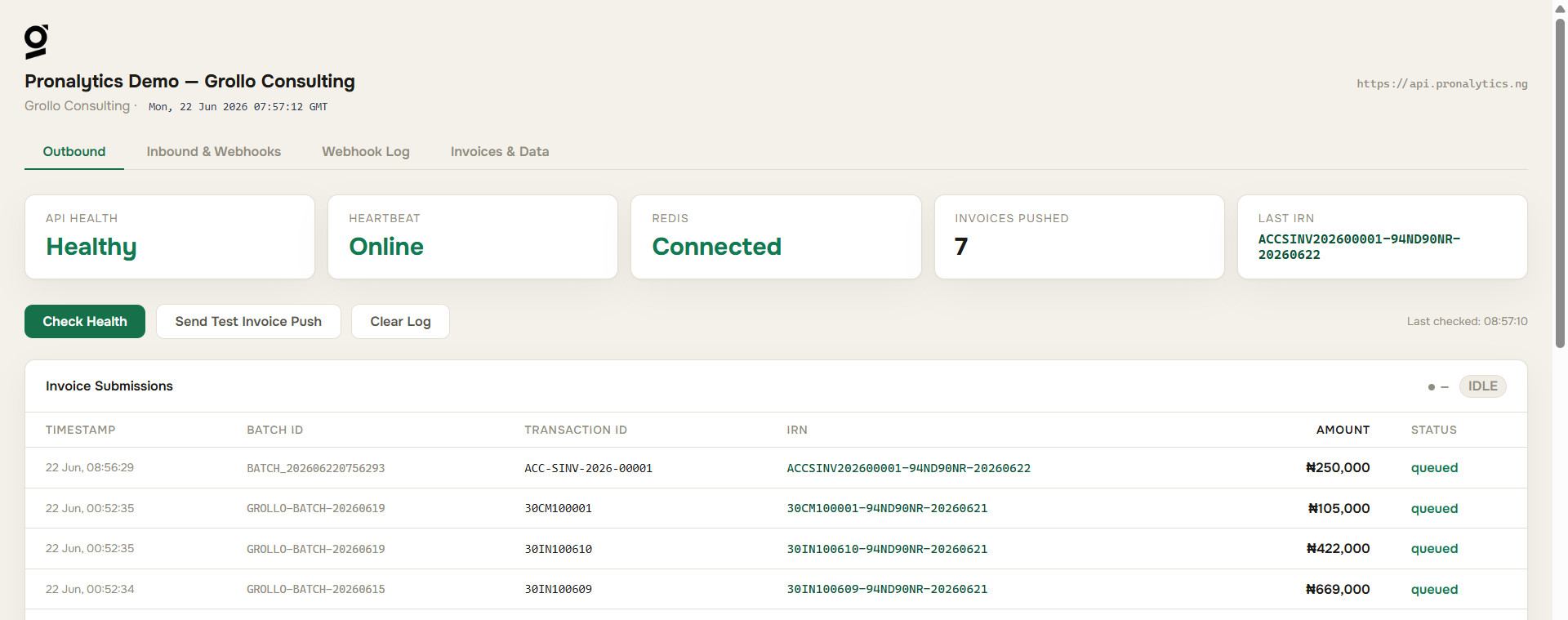
Outbound — push test invoices to us and watch them process live: a service-health indicator, an invoices-pushed counter, your last IRN, a live-updating invoice table, and request/response panels that show the exact signed call we received.
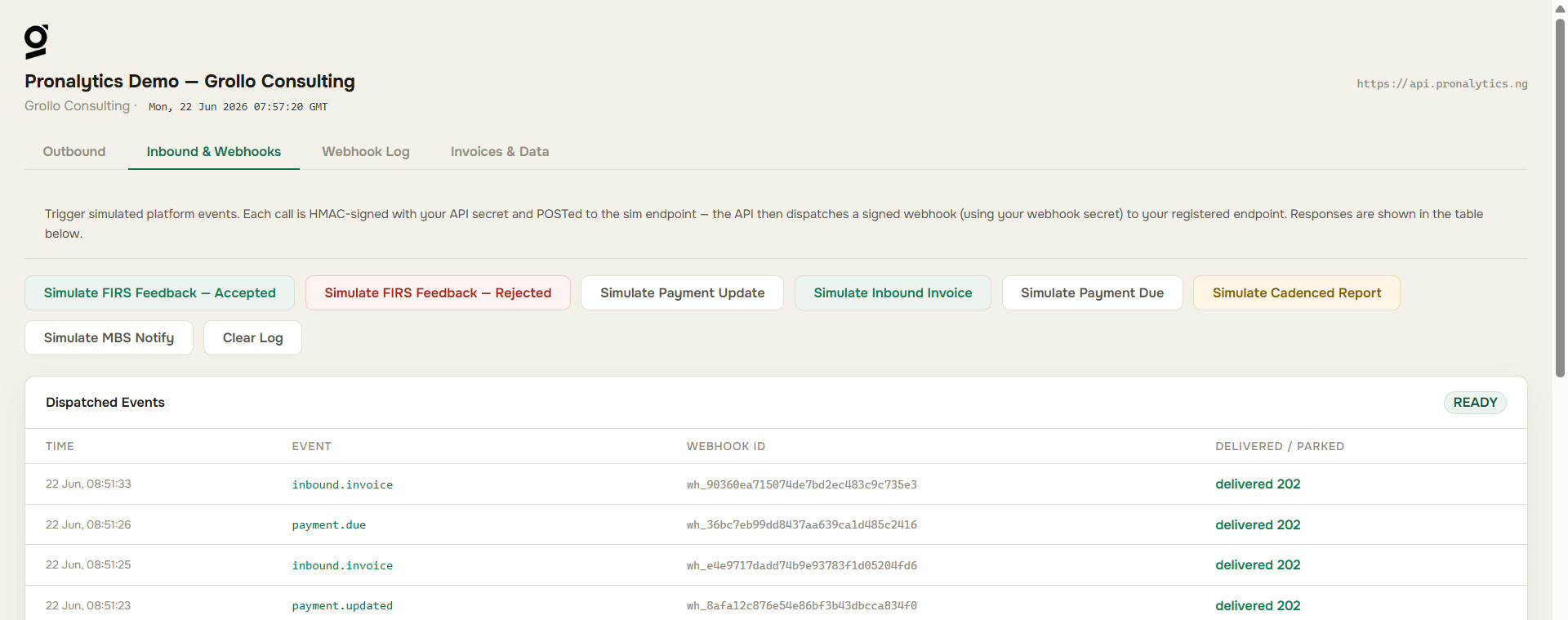
Inbound & Webhooks — fire each webhook event at your registered URL with one click (§1.4).
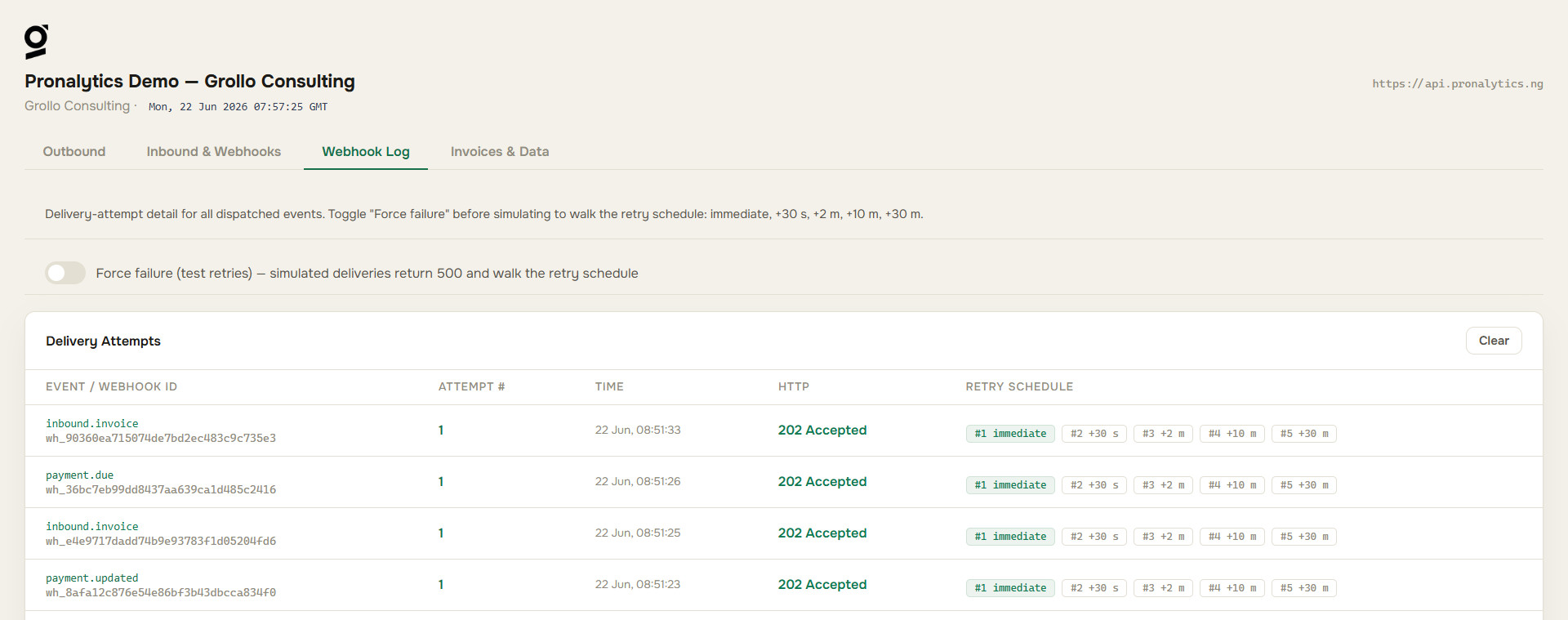
Webhook Log — every webhook delivery, with its headers, signature, HTTP result, and delivery outcome. A force-fail toggle lets you exercise your receiver against a failed delivery.
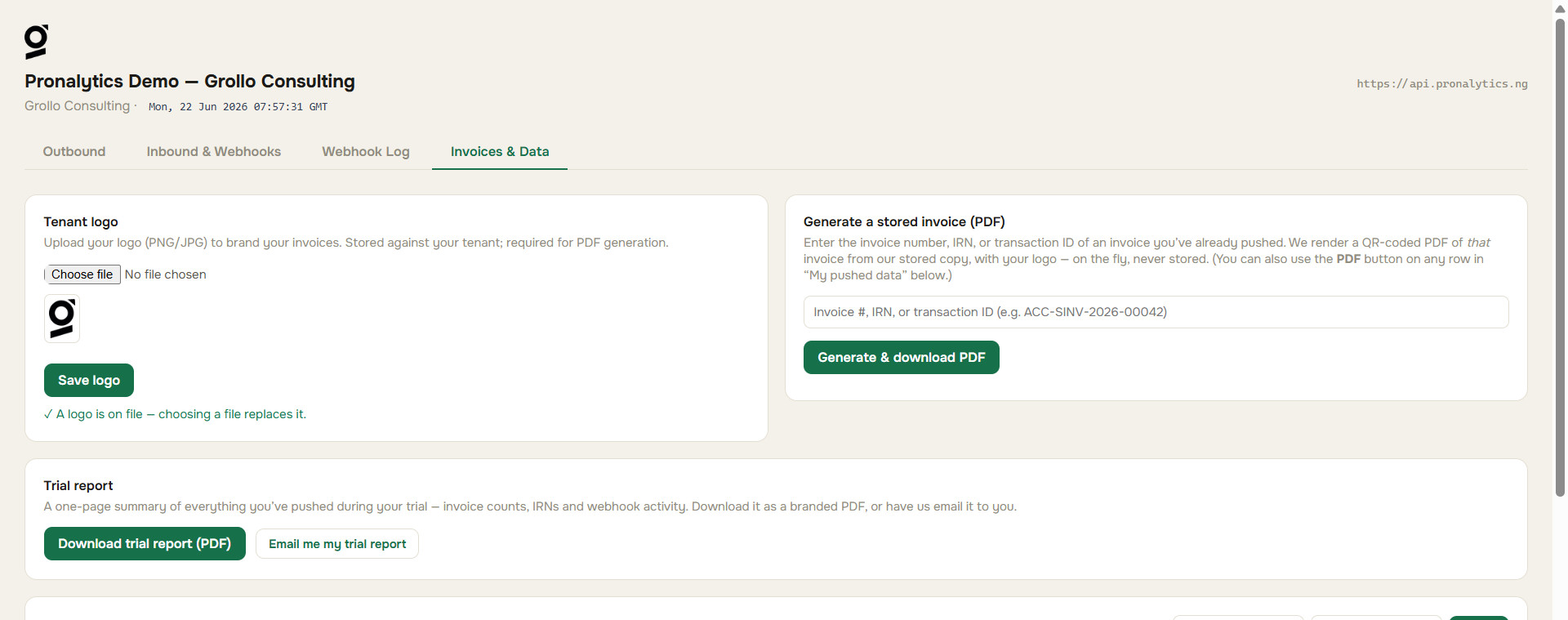
Invoices & Data — upload your logo, generate and download a branded PDF of any invoice you've pushed (§1.5), and list everything you've pushed (§1.6).
1.4 One-click webhook tests
On Inbound & Webhooks, each button makes us send a real, signed webhook to your registered URL and records the delivery in the Webhook Log so you can verify the signature end-to-end:
| Button | Sends event | Notes |
|---|---|---|
| FIRS/NRS feedback — accepted | firs.feedback |
firs_status: accepted, carries the QR |
| FIRS/NRS feedback — rejected | firs.feedback |
firs_status: rejected, carries the reason, no QR |
| Payment update | payment.updated |
FIRS/NRS accepted a payment-status change |
| Inbound invoice | inbound.invoice |
a supplier invoice addressed to you |
| Payment due | payment.due |
a payment falling due on an invoice you issued |
| Cadenced report | report.cadenced |
a scheduled report, delivered as a PDF |
| MBS notify | mbs.notify |
a new business joined the network |
| Update payment status | (calls /api/payment/update) |
acked at once; emits a payment.updated webhook once FIRS/NRS responds |
The two FIRS/NRS-feedback buttons cover the accepted and rejected cases; the full lifecycle we emit — signed, transmitted, duplicate, and error_submitting — is documented with a sample for each in §2.9.
If you set a webhook URL you control, you receive the live POST and can check the X-Webhook-Signature against your webhook secret (2.9). If you haven't set one, the call is still logged so you can see the shape and signing. Tests are throttled: up to 6 per minute and 25 per day per tenant (shared with the /api/sim API calls); past either limit you get a 429.
1.5 Generate a PDF of a stored invoice
On Invoices & Data:
- Upload your logo (left card), optionally — it brands the PDF. Without one, the invoice shows your company name as the seller.
- Enter the invoice number, IRN, or transaction ID of an invoice you've already pushed, and click Generate & download PDF. (Every processed row under My pushed data also has a PDF button that does the same for that invoice.)
We rebuild that invoice on the fly from the data we already hold — your logo (if set), its line items, totals, and a FIRS/NRS QR that encodes the invoice IRN — in the Onest typeface, matching our other apps. You don't re-enter any invoice content; we render what you submitted. We never store the PDF. It downloads straight to you, ready to send to your customer.
1.6 See what you've pushed
Also on Invoices & Data, My pushed data lists every record you've submitted, newest first, with optional date filters and Load more paging. Each processed row has a PDF button to generate a branded copy on the spot.
Part 2 — Integrating by API
2.1 Get access & register (API-only)
For the demo you onboard yourself in about a minute. Registration is a one-time bootstrap: it exists to hand you an API key, API secret and webhook secret. Those credentials authenticate everything you do afterwards (§2.2, §2.3). There are two ways to register by API — pick one:
Option A — with an invitation passkey (instant). Email [email protected] for a single-use invitation passkey, then post it in the passphrase field. Your credentials come back live in the response. The passkey is spent at that point: it authorises this one call and is not an API credential, so no other endpoint accepts it.
curl -X POST https://api.pronalytics.ng/api/register \
  -H "Content-Type: application/json" \
  -d '{
        "company_name": "Grollo Consulting",
        "contact_email":"[email protected]",
        "passphrase":   "<your invitation passkey>",
        "service_id":   "GROLLO01",
        "webhook_url":  "https://your-erp.example/pronalytics/webhook",
        "logo_base64":  "data:image/png;base64,iVBORw0KGgo...",

        "website":      "https://grollo.example",
        "description":  "Freight forwarding and customs clearing for importers.",
        "industry":     "freight forwarding"
      }'
contact_email is required (it's how we reach you with credentials and updates); service_id, webhook_url, and logo_base64 are optional — leave service_id out and we generate one. The passkey is single-use: it is consumed the moment registration succeeds and cannot be reused. An invalid, expired, or already-used passkey returns 403.
The last three — website, description and industry — are optional but recommended. They seed the business profile we consult when we resolve HS and service codes and enrich your records, so sending them makes the classification we return fit your trade instead of a generic best guess. They are editable later from the dashboard or by API, and changing one refreshes the profile. Full explanation in §1.2a; the update path is §2.2b. No FIRS credentials are required or accepted here — those are collected separately, when a submission is first attempted (§2.2a).
{ "status": "registered",
  "tenant_id": "grollo-9b2f1a", "api_key": "GROLLO-2026-7C3D9F12",
  "api_secret": "…", "webhook_secret": "…", "service_id": "GROLLO01",
  "expires_at": "2026-06-27T15:30:00Z", "has_logo": true,
  "limits": { "ingest_per_day": 75, "sim_webhooks_per_day": 25 } }
Your credentials work the moment registration returns. Save the secret — it is not retrievable afterwards.
Option B — without a passkey (request approval). Leave passphrase out; contact_email is required (as it is on every path). We record your request as pending and email you once it is approved; the approval email carries your API key, secret, and dashboard link. No credentials are issued until then.
curl -X POST https://api.pronalytics.ng/api/register \
  -H "Content-Type: application/json" \
  -d '{ "company_name": "Grollo Consulting",
        "contact_email": "[email protected]",
        "webhook_url": "https://your-erp.example/pronalytics/webhook" }'
{ "status": "pending",
  "tenant_id": "grollo-9b2f1a", "service_id": "GROLLO01",
  "message": "Request received — pending approval. You'll get an email when approved." }
Request fields. company_name and contact_email are always required (the email is how we send your credentials and updates). passphrase is optional and decides the path (present → Option A, absent → Option B). service_id, webhook_url, logo_base64, website, description, and industry are optional on both. Send the body as JSON; a non-JSON body returns 400.
What protects this endpoint (abuse controls).
- Per-address rate limit. Registration is capped at 10 attempts per hour per IP. The 11th returns
429. The limit keys on the real client address (set by our proxy), so it can't be dodged by spoofingX-Forwarded-For— this throttles both passphrase brute-forcing and tenant-creation spam. - Flood cap on approval emails. On the no-passphrase path the admin-notification emails are capped per hour across all callers, so a distributed flood of pending requests can't mailbomb our inbox. Your request is still recorded even if that cap is hit; only the internal email is held back.
- Save-before-issue. We persist your tenant before returning credentials. If that write fails we issue nothing and return
500 PERSIST_FAILED— so you never receive a key that wouldn't survive a restart. Retry, or contact support. - Demo lifetime. Self-service tenants are valid for 7 days, after which calls return
403 DEMO_TENANT_EXPIRED(§2.10). Ask support to extend.
A note on CORS. CORS applies to browsers only — it governs which web pages a browser will let read our responses. Server-to-server calls (curl, your ERP's HTTP client) send no browser Origin and are never subject to it, so calling any endpoint here from your own server works regardless of the allowlist. The controls that protect your API calls are the per-IP rate limit and the passphrase/approval gate above.
Production onboarding is different: credentials are issued through a controlled process (OAuth client registration), not a self-service passkey. The invitation-passkey flow above is for the demo.
2.2 Credentials
We hand back three values:
| Credential | What it does |
|---|---|
| API key | Identifies your tenant on every request |
| API secret | Signs the requests you send us |
| Webhook secret | Signs the webhooks we send you |
API key + secret authenticate the calls you make to us; the webhook secret authenticates the calls we make to you. They are independent keys.
The invitation passkey from §2.1 is not in this table. It was a one-time key to registration, and it was consumed there. These three values are the only credentials your integration holds.
Your FIRS/NRS credentials are a separate thing entirely, and are not needed to register — see §2.2a.
2.2a FIRS credentials — when we ask for them
We submit under your FIRS/NRS credentials, never ours, so at some point we have to hold them. That point is not registration.
You can register, be provisioned, connect your system, and push data with no FIRS credentials on file at all. Nothing in onboarding is gated on them. We ask just-in-time — at the moment a FIRS submission is first attempted, and only for the environment being attempted: a demo submission asks for your demo credentials, a production submission asks for your production credentials. They are validated against FIRS/NRS on the spot, accepted or rejected while you wait, and on failure nothing is stored.
Four things count as a first attempt and trigger the request: turning submissions on for an environment; clicking Submit on an invoice row; any action needing a live connection to a FIRS environment; and a /submit API call.
You can also supply them whenever you like, without waiting to be asked — from your dashboard or by API. There is one update-merchant endpoint and it covers both environments; there is no separate call per environment. On the aggregator plane that call is POST /api/aggregator/subtenant/update (§2.11.3). Supplying them in advance means the first submission runs without an interruption.
If they are missing when a submission is asked for, the call returns a plain, actionable error saying the FIRS credentials for that environment are not yet filled and validated, and naming the endpoint that stores them. It is never a stack trace and never a silent success.
The field set, and where each value sits in the FIRS/NRS portal, is a page of its own: How to retrieve your FIRS credentials. In short, per environment: entity_id, business_id, service_id, api_key, api_secret, and the crypto pair (public key + certificate). No private key is ever requested or stored. §2.9a documents the demo-environment wire body and its exact field names.
/ingest vs /submit
The two calls mean different things, and the difference decides whether a missing credential is an error.
| Call | Meaning | Errors when credentials are missing? |
|---|---|---|
/submit |
"I want this invoice (or these invoices) submitted to FIRS." | Yes — the subtle error above, plus the endpoint hint |
/ingest |
"I am not forcing submission; I just want to see my data on the dashboard." | No — it never errors for this reason |
The exception. When
data_mapped,demo_submissions, and validated demo credentials are all three true, both/ingestand/submitsubmit to FIRS. Once a tenant is fully live for demo, ingestion implies fiscalization — there is no longer a way to push a record into it and have it sit unsubmitted. If you want records stored without being fiscalized, do that before the tenant is live for that environment, or leave submissions off.
Until the tenant reaches that state the split holds: /ingest stores and displays, /submit files.
2.2b Your business profile — website, description, industry
Three optional-but-recommended fields carry what your business actually does: website, description, and industry. They can be sent at registration (§2.1), and changed at any time afterwards from your dashboard or by API on the same update-merchant call that carries FIRS credentials (§2.2a) — one endpoint, not one per field group.
What they buy you. Every compliant line needs a classification — an HS code for goods, a service code for services — resolved against a large catalogue of near-neighbours. These three fields seed a profile of your business that we consult on every resolution and enrichment, so the code we reach for fits your trade rather than a generic reading of the line text. Fewer lines come back flagged for manual resolution, and the enrichment you get is specific to what you sell.
Changing them refreshes the profile automatically. Update the description and industry when your business changes and the classifications move with it; nothing needs re-uploading and there is no re-onboarding step.
Unchanged either way: we never derive a TIN, a postcode, or a unit code from a description — those come from what you send or from your registered details. Codes are chosen from the authoritative catalogue, never written freehand, and anything we cannot resolve confidently is flagged rather than guessed.
2.3 Authentication
Every request carries three headers. The scheme is identical across /api/ingest, /api/status, /api/payment/update, /api/transactions, /api/generate_pdf, /api/tenant/logo, /api/webhook/register, and the /api/tenant/firs-demo/* toggle routes (§2.9a). There is no separate login, token, or OAuth handshake: you sign each request directly with your API secret, and the API key plus that signature are the whole of the authentication. (The only endpoint that takes no auth at all is GET /health.)
| Header | Required | Value |
|---|---|---|
X-API-Key |
Yes | Your API key |
X-Timestamp |
Yes | Current UTC time, ISO 8601, e.g. 2026-06-19T15:30:00Z |
X-Signature |
Yes | HMAC-SHA256 of the body (below) |
X-Trace-ID |
no | UUID v4 for tracing. Omit it and we generate one, then return it. |
Content-Type |
Yes | multipart/form-data for ingest, application/json elsewhere |
Build the signature like this:
timestamp = UTC ISO 8601                     # same value you put in X-Timestamp
body_hash = SHA256(raw_request_body).hex()
message   = "{api_key}:{timestamp}:{body_hash}"
signature = HMAC_SHA256(api_secret, message).hex()
The signature protects the request body against tampering, and the timestamp window (5 minutes) blocks anyone replaying a captured request. Even if a replay slipped inside that window, transaction_id deduplication means it cannot create a second invoice — a replayed call comes back as a duplicate (§2.4).
Three things trip people up:
- Clock drift. The timestamp has to be within five minutes of our server. If your host drifts, you get a
401. Keep it on NTP. - Re-built bodies. Sign the exact bytes you send. If you build a multipart form, sign it, then rebuild it, the boundary changes and the signature no longer matches.
- Wrong thing signed. The signature is over the raw body, not the headers or the URL.
import hashlib, hmac
from datetime import datetime, timezone

def sign(api_key, api_secret, raw_body: bytes):
    ts = datetime.now(timezone.utc).strftime("%Y-%m-%dT%H:%M:%SZ")
    h  = hashlib.sha256(raw_body).hexdigest()
    sig = hmac.new(api_secret.encode(), f"{api_key}:{ts}:{h}".encode(), hashlib.sha256).hexdigest()
    return ts, sig
2.4 Submit invoices — POST /api/ingest
Send invoices as multipart/form-data, not as a raw JSON request body. Your invoices go in the invoice_data_json form field as a JSON string. The multipart wrapper is what lets you attach a source file, such as a PDF, in the same request.
import hashlib, hmac, json, requests
from datetime import datetime, timezone

API_KEY, API_SECRET = "your-api-key", "your-api-secret"
BASE = "https://api.pronalytics.ng"

def sign(body: bytes):
    ts = datetime.now(timezone.utc).strftime("%Y-%m-%dT%H:%M:%SZ")
    h  = hashlib.sha256(body).hexdigest()
    sig = hmac.new(API_SECRET.encode(), f"{API_KEY}:{ts}:{h}".encode(), hashlib.sha256).hexdigest()
    return ts, sig

invoices = [{"transaction_id": "ACC-SINV-2026-00042",
             "issue_date": "2026-06-19", "due_date": "2026-07-19", "currency": "NGN",
             "customer": {"name": "Mollo Industries", "tin": "12345678-0001", "email": "[email protected]"},
             "line_items": [{"description": "Freight", "quantity": 1, "unit_price": 250000.00, "hsn_code": "9967", "vat_rate": 7.5}]}]

req = requests.Request("POST", f"{BASE}/api/ingest", data={
    "invoice_data_json": json.dumps(invoices),
    "metadata": json.dumps({"batch_id": "BATCH-001"}),
    "call_type": "external",
}).prepare()

ts, sig = sign(req.body or b"")
req.headers.update({"X-API-Key": API_KEY, "X-Timestamp": ts, "X-Signature": sig})
print(requests.Session().send(req).json())
What you must send
| Field | Description |
|---|---|
invoice_data_json |
Your invoices, as a JSON array (or a single object). Every record must carry a transaction_id. |
Optional
| Field | Description |
|---|---|
metadata |
connection_type, queue_mode, user_trace_id, and batch_id if you keep it here. |
batch_id |
Submission identifier (form field, or inside metadata). Optional — omit it and we mint one, treating the submission as a single transaction (the transaction_id is the durable key). Send your own only when one submission carries more than one transaction and you want to correlate them under one id. |
call_type |
Defaults to external — the only value an external caller needs. Other values are reserved for our own test console; omit it. |
files |
1–3 reference documents (.pdf .xml .json .csv .xlsx) to store alongside the invoice. |
default_schema |
Boolean, optional, default false. Set it (per record, or as metadata.default_schema) to assert this payload is already our canonical default schema — so we validate and compute against the canon directly and skip per-tenant adapter mapping. See Default-schema ingress below. |
The identifiers
transaction_id is the only field we require inside a record. It is your unique reference for the line, and it does two jobs: it stops the same invoice being submitted twice, and it seeds the IRN. Send a record without one and that record is rejected.
invoice_number is optional. If you send it, the IRN uses it; if you do not, the IRN falls back to transaction_id. For most ERPs the two are the same value.
The IRN comes out as {invoice_number or transaction_id}-{service_id}-{YYYYMMDD}, where service_id is your FIRS/NRS-assigned code and YYYYMMDD is the date we process the invoice (not your issue date).
Default-schema ingress (default_schema)
default_schema (boolean, optional, default false) is a per-call assertion that the payload you are sending is already our canonical default schema — so you don't need a per-tenant adapter and you want the canon result back instantly. It can be set on each record, or once for the submission as metadata.default_schema.
default_schema |
Validation | VAT / total echo | Adapter | On drift |
|---|---|---|---|---|
true |
Validated against the canonical invoice model. | Computed inline and echoed instantly from the canon — not gated on data_mapped. |
Skipped — you asserted canon, so no mapping runs. | You claimed canon and the record doesn't match → that record is rejected 422 with the validation error. |
false / absent |
Body-agnostic — only transaction_id is required. |
Echoed only once your tenant is mapped (data_mapped: true, §2.4b). |
Per-tenant adapter / field mapping. | Tolerated — the body is accepted and stored opaque. |
This is orthogonal to data_mapped (§2.4b): data_mapped is a per-tenant state ("we built an adapter for your native feed"), while default_schema is a per-call flag ("this one payload is already canon, no adapter needed"). default_schema:true is the fast path — instant VAT + canon validation feedback (the canon variance notes ride out on invoice.feedback, §2.9 / Appendix B) without waiting for a mapping to be built. With default_schema absent, nothing changes from the body-agnostic behaviour described above.
IRN and QR generation
Pronalytics generates the IRN and the QR code — not FIRS/NRS. The moment we accept an invoice at /api/ingest, we mint both and return them in the same response. They are Pronalytics-issued tracking identifiers, assigned before the invoice is ever submitted to FIRS/NRS:
- globally unique within Pronalytics,
- stable for the life of the invoice — the IRN never changes, and
- returned immediately in
processed[].
In production, FIRS/NRS processing is asynchronous and only updates status: after we return the IRN + QR we submit the invoice to FIRS/NRS in the background; FIRS/NRS does not create or replace the IRN or QR — it moves the invoice through accepted → signed → transmitted (or rejected / duplicate / error_submitting), relayed to you on firs.feedback (§2.9), and the submission is fiscally valid once it returns signed.
On this demo, nothing is fiscalised. We do not submit to FIRS/NRS — the IRN and QR are demo tracking identifiers, and the
firs.feedbacklifecycle is simulated so you can exercise the full flow end to end. The same flow against real FIRS/NRS keys produces fiscally valid documents in production.
Everything else in a record is yours to define. Add whatever fields your business needs; we carry the full record through and extract it later. The API does not validate your custom fields. It only requires the transaction_id.
What you don't send. Leave out your seller / supplier details — we hold those for you from registration and attach them automatically. Leave out the irn and qr_code — we generate both and hand them back. Sending any of these is ignored. The recommended fields below mirror the FIRS/NRS schema minus exactly those, so what you push maps straight onto a compliant invoice.
Recommended fields (FIRS/NRS-aligned)
On the demo we require only transaction_id; the rest of the body is open. But the closer your record sits to the FIRS/NRS schema, the cleaner it maps to a compliant invoice — so these are the fields we recommend; for the complete field-by-field shape, see the Canonical Invoice Body Schema. Seller details, IRN, and QR are deliberately absent (we hold the first, we generate the last two).
| Field | Required | Notes |
|---|---|---|
transaction_id |
yes | Your unique reference. Dedupes the invoice and seeds the IRN. |
invoice_number |
no | Human invoice number; defaults to transaction_id. |
invoice_type_code |
no | FIRS/NRS type — 381 commercial (default), 380 credit note, 384 debit note. |
issue_date |
yes | YYYY-MM-DD, not future-dated. |
due_date |
no | YYYY-MM-DD. Payment deadline; defaults to the issue date. |
currency |
no | ISO 4217; defaults to NGN. |
payment_status |
no | PENDING (default) or PAID. Partial payments come in a later iteration — FIRS/NRS has introduced a partial status, but its fiscal treatment isn't settled yet. |
customer |
B2B | Omit entirely for B2C. If present, name, tin, email, and address are all required (FIRS/NRS conditional-mandatory rule). |
customer.tin |
with customer |
Buyer's RC number, old TIN (########-####), or 13-digit Tax ID — any of the three. |
customer.address |
with customer |
{ street, city, state, lga, country }; country is the ISO-2 code (NG). |
line_items[] |
yes | At least one. Each item: description (req), quantity (req), unit_price (req), hsn_code (FIRS/NRS product code), vat_rate (defaults 7.5). |
total_amount, vat_amount |
no | We compute VAT at 7.5% and the total when omitted; send them to override. |
Example body
[
  {
    "transaction_id":    "ACC-SINV-2026-00042",
    "invoice_number":    "ACC-SINV-2026-00042",
    "invoice_type_code": "381",
    "issue_date":        "2026-06-19",
    "due_date":          "2026-07-19",
    "currency":          "NGN",
    "payment_status":    "PENDING",
    "customer": {
      "name":  "Mollo Industries",
      "tin":   "12345678-0001",
      "email": "[email protected]",
      "address": { "street": "12 Marina Rd", "city": "Lagos", "state": "Lagos", "lga": "Lagos Island", "country": "NG" }
    },
    "line_items": [
      { "description": "Freight forwarding, June", "hsn_code": "9967", "quantity": 1, "unit_price": 250000.00, "vat_rate": 7.5 }
    ]
  }
]
Omit customer for a B2C invoice — and don't send personal details (PII) about a consumer; they aren't required. Don't add seller details either — we already have your company details (as the seller) in our records — and don't send irn or qr_code; we generate and return them.
Response
Every ingest call sorts each record into one of three buckets, returned as parallel arrays:
- Accepted →
processed[], with theirnandqr_codefor that transaction. - Duplicate — already received; neither a success nor a failure →
duplicates[], withduplicate_of(the original'sirn/transaction_id). - Any other error →
failed[], with anerrormessage for that record. (Whole-request failures — bad auth, malformed JSON, quota — return a top-levelerror_code+messageinstead; see Errors and recovery.)
The HTTP status reflects the batch as a whole:
| HTTP | status |
Meaning |
|---|---|---|
200 |
ok |
Every record was accepted. |
207 |
partial |
A mix — some accepted, some duplicate or failed. Read the arrays. |
422 |
rejected |
Nothing was accepted. |
{
  "status":    "ok",
  "batch_id":  "BATCH_20260619153000",
  "trace_id":  "550e8400-e29b-41d4-a716-446655440000",
  "summary":   { "total": 1, "processed": 1, "duplicates": 0, "failed": 0 },
  "processed": [
    {
      "transaction_id":  "ACC-SINV-2026-00042",
      "irn":             "ACCSINV202600042-NX7F2K9Q-20260619",
      "qr_code":         "data:image/png;base64,iVBORw0KGgo...",
      "data_uuid":       "019600ab-3f2a-7c11-8d4e-2a1b3c4d5e6f",
      "vat_amount":      18750.00,
      "total_amount":    268750.00,
      "vat_computation": "calculated"
    }
  ],
  "duplicates": [],
  "failed":     []
}
Every record comes back with an irn and qr_code immediately — Pronalytics-issued tracking identifiers for the invoice. Keep them (and data_uuid) against your records. vat_amount and total_amount are echoed back only once your tenant is mapped (data_mapped: true, §2.4b); until then we accept and store the record but don't return the figures. vat_computation is calculated (we applied 7.5% because you left VAT out) or exact (we used the vat_amount you sent). The final FIRS/NRS result reaches you on the firs.feedback webhook.
Retrying safely. transaction_id is also your idempotency key. If a call times out and you resend the same batch, any record that actually went through the first time comes back in duplicates[] — that is your confirmation the original succeeded. Treat a duplicate-on-retry as success and take the IRN from duplicate_of; never resubmit it under a fresh transaction_id.
2.4a How you integrate
Two independent choices: how your system calls us, and how you get feedback.
How you call us
- (a) You call our API. Sign each request and hit our endpoints —
/api/ingest(§2.4) and the rest of Part 2. The happy path; all most ERPs need. - (b) You notify us. For systems that emit events but don't make signed API calls, we register a webhook URL against your platform and your system notifies us on each event. This route carries more than invoices — payments, updates, deletes — and is set up per integration. See Appendix A.
How you get feedback
- Partial-async — immediate, synchronous feedback on what we generate (IRN, QR, extracted tax amounts, payment status, duplicate…): on the response to your API call, or — in the notify flow — as a payload in the acknowledgement to your call, if your endpoint accepts one. The final FIRS/NRS verdict still arrives later on
firs.feedback(§2.9). - Full-async — if your notify endpoint only returns a bare 200 OK (no payload), there's no channel for the result on the way in. Enable
invoice.feedback(off by default) on your subscription and we deliver the IRN + QR on your webhook instead; the FIRS/NRS verdict still arrives onfirs.feedback(§2.9). See Appendix A.
You can mix routes — transaction_id deduplication absorbs any overlap.
2.4b Data mapping
To generate invoice PDFs (§2.8), run the report APIs (§2.8 Reports), and return VAT/tax feedback on a synchronous ingest call, we have to understand the shape of your invoice — its line items, amounts, and parties. Those arrive as a very different JSON shape from each ERP, so we cannot read the figures blind. Mapping is how we line your shape up against our canonical one. There are two ways to be mapped.
1 · Flow our canonical shape. Send the recommended fields already in §2.4 (transaction_id, line_items[], customer, amounts, dates) and there is nothing to map — you are mapped by default. This is the path most ERPs take, and the one we recommend.
2 · Send your own shape. If your records keep their own field names and structure, that is fine too. Your shape must carry a transaction_id on every record (and a batch_id in metadata when one submission contains more than one transaction — §2.4). We then map your shape onto the canonical one — typically 2–3 days — after which data_mapped becomes true for your tenant.
What data_mapped = true enables
Until your tenant is mapped, we can accept and store your records, but we cannot reliably extract the figures — so the three features that depend on reading them are unavailable. Mapping turns all three on:
| Feature | Where | Available before mapped? |
|---|---|---|
| PDF generation | §2.8 POST /api/generate_pdf, dashboard §1.5 |
no |
| Report APIs | §2.8 reports, report.cadenced (§2.9) |
no |
| VAT + total amount on synchronous ingest | §2.4 ingest response (vat_amount, total_amount, vat_computation) |
no |
Send the canonical shape and all three are on from your first call. Send your own shape and they switch on once mapping completes.
What the demo does (and what it doesn't)
Demo caveat. The data mapping on this demo is light and ephemeral — just enough to read basic invoice data so the demo's PDFs, reports, and VAT feedback work. It is not the deep mapping we do after a formal engagement, which covers the nuances of your ERP's data and an end-to-end analysis of your financial figures. Treat what you see here as a working preview of the model, not the finished mapping.
The full deep mapping is set up at onboarding, per ERP.
The canonical body schema
The complete canonical schema is published as a separate document — the Canonical Invoice Body Schema. Start from the Recommended fields (FIRS/NRS-aligned) table in §2.4 — that is the canonical shape's core, and a record built to it is mapped by default. See the full schema — field-by-field, with the FIRS/NRS UBL mapping, the credit/debit-note reference fields, and submission nuances — when you are ready to map a custom shape.
Note. The default ingest body schema / default data shape is being finalized separately and will be updated here shortly.
2.5 Check status — POST /api/status
Put the lookup key in the body, never in the URL. You can look up by transaction_id, irn, or batch_id. A batch_id returns every invoice in that batch.
{ "transaction_id": "ACC-SINV-2026-00042" }
{
  "status":         "found",
  "transaction_id": "ACC-SINV-2026-00042",
  "irn":            "ACCSINV202600042-NX7F2K9Q-20260619",
  "stage":          "submitted",
  "firs_status":    "pending",
  "qr_code":        "data:image/png;base64,iVBORw0KGgo...",
  "batch_id":       "BATCH_20260619153000",
  "pdf_available":  true
}
pdf_available is true once the record is submitted — meaning you can pull a QR-coded PDF for it (2.8), branded with your logo if you've set one. The single response also carries result (processed / duplicate / failed); a batch_id lookup instead returns { status, batch_id, count, invoices: [...] }. You rarely need status otherwise: the webhook sends you the FIRS/NRS result as soon as it lands, so treat status as a fallback for a missed webhook. An unknown reference returns 404.
Bulk lookup — POST /api/status/batch. To check many at once, send any mix of arrays — we never guess an id's type:
{ "transaction_ids": ["ACC-SINV-2026-00042", "ACC-SINV-2026-00043"],
  "batch_ids": ["BATCH_20260619153000"], "irns": [] }
Returns 200 with results (one entry per matched key; a batch_id yields {batch_id, count, invoices[]}) and not_found (the keys we hold nothing for). Max 200 keys per call.
2.6 Update payment status — POST /api/payment/update
Tell us when an invoice gets paid (for example, pending to paid). We return a simple acknowledgement right away — whether you call this endpoint directly or send it through the notify flow (§2.4a). Then, once our internal checks run and we have FIRS/NRS's response, we deliver the accepted result to your webhook as payment.updated (§2.9).
{ "transaction_id": "ACC-SINV-2026-00042", "payment_status": "paid" }
irn is optional. If you leave it out, we look it up from your original submission.
{ "status": "updated", "transaction_id": "ACC-SINV-2026-00042", "payment_status": "paid", "irn": "ACCSINV202600042-NX7F2K9Q-20260619" }
2.7 List what you've submitted — POST /api/transactions
Returns every record you have pushed, newest first, with cursor pagination and an optional time filter. Same HMAC headers; JSON body (all fields optional).
| Field | Value |
|---|---|
limit |
Page size (default 50, max 200) |
cursor |
Opaque cursor from the previous page's next_cursor |
since / until |
ISO 8601 UTC bounds, e.g. 2026-06-01T00:00:00Z |
{ "status": "ok", "count": 25,
  "transactions": [ { "transaction_id": "...", "irn": "...", "result": "processed",
                      "has_qr": true, "batch_id": "...", "timestamp": "..." } ],
  "next_cursor": "<opaque or null>" }
To page, send the returned next_cursor back as cursor. When it comes back null, you have reached the end. The cursor is keyed on insertion order (newest first) and stays valid across the whole page-through — no expiry to manage. New invoices pushed while you page land at the top, so they won't appear in pages you've already passed; re-query from the start (or use a since / until window) to catch them. No record is skipped or duplicated.
2.8 Generate an invoice PDF — POST /api/generate_pdf
What this is for. Some ERPs can't stamp the FIRS/NRS QR code onto their own invoice template. So we carry it for you. You give us only a reference — the irn or the invoice_number of an invoice you have already submitted to us — and we rebuild a clean, QR-coded PDF of that invoice from the data we already hold for you, with the FIRS/NRS QR + IRN already placed on it, ready to send to your customer. You do not send invoice fields here. We do not accept line items, customer details, or any invoice content on this call; we use what you pushed at ingest. The endpoint only covers the outbound invoices you issued (your accounts receivable) — it does not render inbound supplier invoices. If your ERP can place the QR itself, you don't need this endpoint; take qr_code + irn from the ingest response and stamp your own document. We render the PDF on the fly and never store it. The response is application/pdf; same HMAC headers, JSON body.
{ "irn": "ACCSINV202600042-NX7F2K9Q-20260619" }
or, equivalently, by invoice number:
{ "invoice_number": "ACC-SINV-2026-00042" }
Send one of irn or invoice_number (a transaction_id is also accepted) and nothing else — there are no other body fields. We look the invoice up among the records you pushed and render it from the stored data.
The QR encodes the invoice's IRN — a FIRS/NRS-valid QR when your FIRS/NRS keys are on file, a demo QR of the same form otherwise. We take the IRN from the stored record you reference; you do not supply it. If we hold no invoice for that reference under your tenant, you get a 404 — the endpoint only renders invoices you have already pushed, and only your own. A logo is optional — add one for branding (below); without it the invoice shows your company name as the seller in the header. Because the PDF is rebuilt from stored data, the same reference always reproduces the same invoice.
Add your logo (optional) — POST /api/tenant/logo
{ "logo_base64": "data:image/png;base64,iVBORw0KGgo..." }
You can also upload the logo on the registration page or in your dashboard.
Reports
We build reports from the invoices we actually hold for you — counts, IRNs, and activity over the period — rendered as a PDF via POST /api/trial-report/pdf (and emailed at the end of a trial). When we have no invoices for you yet, the report is a clean one-page "No invoices fiscalized yet" notice rather than a table of zeros. Scheduled reports also arrive on the report.cadenced webhook as a PDF — a base64 PDF data URI in data.report_pdf (§2.9).
2.9 Webhooks (us → you)
We call your registered URL and push eight types of events to you.
| Event | Fires when |
|---|---|
inbound.invoice |
A supplier invoice addressed to you arrives over the NRS network. |
firs.feedback |
NRS returns a result on an invoice you submitted (the full submission lifecycle). |
payment.updated |
A payment-status change you submitted has been checked and accepted by NRS. |
payment.due |
A payment is due on an invoice you issued. |
report.cadenced |
A scheduled report is ready, delivered as a PDF. |
mbs.notify |
A membership notice, such as a new business joining the network. |
invoice.feedback |
Off by default. The synchronous ingest result (IRN + QR + tax amounts + canon notes) delivered on your webhook for the full-async / notify flow — subscribe to it explicitly to receive it (§2.4a, Appendix A, Appendix B). |
demo.submission_now_allowed |
Your payload has just been mapped (data_mapped flipped false → true), so real NRS Test submission is now available (§2.9a). |
demo.submission_on |
You successfully enabled real NRS Test submission — credentials validated, secrets vaulted, the toggle is now ON (§2.9a). |
Register once:
POST /api/webhook/register
{ "webhook_url": "https://erp.you.example/pronalytics/webhook",
  "events": ["inbound.invoice", "firs.feedback", "payment.updated", "payment.due", "report.cadenced", "mbs.notify", "demo.submission_now_allowed", "demo.submission_on"] }
You can fire any of these from the dashboard's Inbound & Webhooks tab (1.4) to test your receiver. They use the same path as the API and are throttled the same way — at most 6 per minute and 25 per tenant per day (see 2.10); past either you get a 429 until the window resets.
Verifying what we send
Each webhook carries these headers: X-Webhook-Id (reused across retries, so you can deduplicate), X-Webhook-Event, X-Webhook-Timestamp, X-Webhook-Signature, X-Trace-ID, and Content-Type: application/json.
We sign every webhook with your webhook secret, using the exact same construction as the requests you send us (§2.3) — only the key and the id field change. Your own request signs "{api_key}:{timestamp}:{body_hash}" with your api_secret; our webhook to you signs "{webhook_id}:{timestamp}:{body_hash}" with your webhook_secret. Same HMAC-SHA256, same body_hash = SHA256(raw_body), same colon-joined message — swap api_secret → webhook_secret and api_key → webhook_id, and the signing code you already wrote for outbound requests verifies our inbound webhooks too:
body_hash = SHA256(raw_json_body).hex()
message   = "{webhook_id}:{timestamp}:{body_hash}"   # your requests use {api_key} here
signature = HMAC_SHA256(webhook_secret, message).hex()   # your requests use api_secret
Recompute it over the exact bytes we send (compact JSON, no extra spaces), compare in constant time, and reject anything older than five minutes before you trust the payload. Then return 2xx.
def verify(headers, raw_body: bytes, webhook_secret: str) -> bool:
    h = hashlib.sha256(raw_body).hexdigest()
    msg = f'{headers["X-Webhook-Id"]}:{headers["X-Webhook-Timestamp"]}:{h}'
    expected = hmac.new(webhook_secret.encode(), msg.encode(), hashlib.sha256).hexdigest()
    return hmac.compare_digest(expected, headers["X-Webhook-Signature"])
Every event uses the same envelope, { event, webhook_id, timestamp, tenant_id, data }. The data differs per event. The examples below show each shape in context; for the authoritative field-level reference — every field, its type, nullability, and when it's populated — see Appendix B — Webhook data shapes. You can deep-link straight to one event, e.g. #shape-payment-updated.
firs.feedback — the whole FIRS/NRS lifecycle for an invoice you submitted, all on this one event (feedback_type: invoice_submission). A payment-status change you submit gets its own payment.updated event (below), not this one. Match to your records on transaction_id / irn / invoice_number. Every payload carries the same fields; the status-specific ones below are populated as noted and null otherwise. firs_status is one of:
firs_status |
Meaning | Populated fields |
|---|---|---|
accepted |
FIRS/NRS accepted the submission | qr_code |
signed |
FIRS/NRS signed it — IRN + QR are now valid | qr_code |
transmitted |
the invoice was fully transmitted to the buyer (a third party) | qr_code |
rejected |
FIRS/NRS rejected it | reason (FIRS/NRS text); qr_code null |
duplicate |
already submitted | duplicate_of = the original { irn, transaction_id } |
error_submitting |
submission failed before any FIRS/NRS verdict (we retry) | message (why) |
signed — IRN + QR are valid:
{ "feedback_type": "invoice_submission", "transaction_id": "ACC-SINV-2026-00042",
  "invoice_number": "ACC-SINV-2026-00042", "irn": "ACCSINV202600042-NX7F2K9Q-20260619",
  "firs_status": "signed", "payment_status": null, "qr_code": "data:image/png;base64,...",
  "reason": null, "message": null, "duplicate_of": null, "at": "2026-06-19T15:31:11Z" }
transmitted — delivered to the buyer:
{ "feedback_type": "invoice_submission", "transaction_id": "ACC-SINV-2026-00042",
  "irn": "ACCSINV202600042-NX7F2K9Q-20260619", "firs_status": "transmitted",
  "qr_code": "data:image/png;base64,...", "reason": null, "message": null,
  "duplicate_of": null, "at": "2026-06-19T15:33:02Z" }
duplicate — already submitted; duplicate_of points to the original:
{ "feedback_type": "invoice_submission", "transaction_id": "ACC-SINV-2026-00042",
  "irn": "ACCSINV202600042-NX7F2K9Q-20260619", "firs_status": "duplicate", "qr_code": null,
  "duplicate_of": { "irn": "ACCSINV202600042-NX7F2K9Q-20260619", "transaction_id": "ACC-SINV-2026-00042" },
  "reason": null, "message": null, "at": "2026-06-19T15:31:40Z" }
rejected — reason holds the FIRS/NRS text:
{ "feedback_type": "invoice_submission", "transaction_id": "ACC-SINV-2026-00042",
  "irn": "ACCSINV202600042-NX7F2K9Q-20260619", "firs_status": "rejected", "qr_code": null,
  "reason": "Buyer TIN failed FIRS/NRS validation.", "message": null, "duplicate_of": null,
  "at": "2026-06-19T15:31:20Z" }
error_submitting — no FIRS/NRS verdict yet; message holds why, and we retry:
{ "feedback_type": "invoice_submission", "transaction_id": "ACC-SINV-2026-00042",
  "irn": "ACCSINV202600042-NX7F2K9Q-20260619", "firs_status": "error_submitting", "qr_code": null,
  "message": "Submission to FIRS/NRS did not complete; no verdict yet.",
  "reason": null, "duplicate_of": null, "at": "2026-06-19T15:31:05Z" }
The original accepted shape is unchanged: same envelope, firs_status: "accepted", qr_code present.
payment.updated — the result of a payment-status change you submitted via /api/payment/update (§2.6). We acknowledge the change immediately; then, after our internal checks and a synchronous call to FIRS/NRS, this event delivers the accepted result. Match on transaction_id / irn.
{ "transaction_id": "ACC-SINV-2026-00042", "irn": "ACCSINV202600042-NX7F2K9Q-20260619",
  "payment_status": "paid", "accepted": true, "reason": null, "at": "2026-06-19T16:02:44Z" }
If FIRS/NRS declines the change, accepted is false and reason carries the text.
inbound.invoice — a supplier invoice for you. document_ref fetches the source document. qr_code is a base64 PNG data URI when the inbound invoice carries one, null otherwise — handle it as nullable.
{ "irn": "SUP1042-AB12CD34-20260619", "supplier": { "name": "Mollo Industries", "tin": "87654321-0001" },
  "issue_date": "2026-06-19", "currency": "NGN", "total_amount": 537500.00, "vat_amount": 37500.00,
  "lines": [ { "description": "Office consumables", "quantity": 1, "unit_price": 500000.00, "vat_rate": 7.5 } ],
  "document_ref": "019600d0-...", "qr_code": "data:image/png;base64,..." }
payment.due — a payment falling due on an invoice you issued. buyer is { name, tin } when on record, null otherwise — handle it as nullable.
{ "transaction_id": "ACC-SINV-2026-00042", "irn": "ACCSINV202600042-NX7F2K9Q-20260619",
  "amount_due": 268750.00, "currency": "NGN", "due_date": "2026-07-19",
  "buyer": { "name": "Mollo Industries", "tin": "12345678-0001" } }
report.cadenced — report_pdf is the report document as a base64 PDF data URI (decode it, then store or forward the PDF); summary carries the headline metrics. period is the span it covers, intended_role the designation it is meant for. In the demo it fires every 7 days. (You can also trigger one on demand from the dashboard, §1.4.)
{ "report_type": "submission_activity",
  "report_pdf": "data:application/pdf;base64,JVBERi0xLjQKJ…",
  "summary": { "invoices_processed": 412, "duplicates": 3, "failed": 1 },
  "customer_tin": "11223344-0001", "period": { "from": "2026-05-01", "to": "2026-05-31" },
  "intended_role": "Finance Controller" }
mbs.notify — a new business is now on the network and can transact with you.
{ "notify_type": "new_member_joined",
  "new_member": { "name": "Mollo Industries", "tin": "55667788-0001", "business_id": "b1d2..." },
  "at": "2026-06-19T15:40:00Z" }
demo.submission_now_allowed — fired the moment your tenant's data_mapped flag flips false → true, i.e. your payload has been mapped to the canonical shape. From here you are eligible to turn on real NRS Test submission with your own NRS Test sandbox credentials (§2.9a). It carries your service_id, a human message, and the timestamp at.
{ "service_id": "GROLLO01",
  "message": "You are now eligible to enable real FIRS demo submission.",
  "at": "2026-06-22T14:35:07Z" }
demo.submission_on — fired on a successful POST /api/tenant/firs-demo/enable (§2.9a): your NRS Test credentials were validated live, the secrets were vaulted, and the toggle is now ON. It carries the (post-supersede) service_id, your registered business_id, a human message, and the timestamp at.
{ "service_id": "GROLLO01",
  "business_id": "b1d2c3e4-5678-90ab-cdef-1234567890ab",
  "message": "Real FIRS demo submission is now active.",
  "at": "2026-06-22T14:36:10Z" }
If your endpoint does not answer
We expect a 2xx once you have stored the event. Anything else, or a timeout past ten seconds, is a failed delivery, and we retry several times over the following half hour before giving up and following up out of band. Because the X-Webhook-Id stays the same across retries, you may see a webhook more than once — deduplicate on that ID.
2.9a Real NRS Test submission — the toggle
Everything else in this guide is simulated: the IRN and QR are demo tracking identifiers and the firs.feedback lifecycle is synthetic (§2.4). This section describes the one exception. If you hold your own NRS Test sandbox credentials, you can connect them and flip a per-tenant toggle that authorizes Pronalytics to submit the invoices you push to the real NRS Test portal (eInvoice.firs.gov.ng TEST) under your credentials, with a genuine NRS Test QR — instead of the simulated IRN/QR everything else uses.
Test sandbox only — never production. This toggle connects your NRS TEST sandbox account and submits to the NRS Test environment only. It never touches production NRS, and nothing here fiscalises a live document. Do not enter live/production credentials. Going live is a separate, deeper engagement.
What's live today. The credential connection is live end-to-end:
status/enable/disablework, your NRS Test credentials are validated live against the NRS Test environment and vaulted, the toggle flips, and thedemo.submission_*webhooks fire. The remaining step — Pronalytics relaying your pushed invoices into the NRS Test portal under those credentials — is being finalized; until it ships, the IRN/QR andfirs.feedbacklifecycle stay the simulated demo values described in §2.4. We'll announce when live Test submission is active.
Where to get the credentials. The six values, and where each one sits in the FIRS/NRS portal, are set out step by step in How to retrieve your FIRS credentials. Read that first if you have not collected them yet; this section is the wire contract for handing them over.
The gate — mapping first. Real submission can only be turned on once your tenant is mapped (data_mapped: true, §2.4b) — until we can read your payload we can't build a compliant submission. The moment an admin maps you (data_mapped flips false → true) we fire demo.submission_now_allowed (§2.9) to tell you the toggle is now available.
Three endpoints drive the toggle. All three use the same tenant HMAC authentication as every other /api/tenant/* route — X-API-Key, X-Timestamp, X-Signature over the raw JSON body (§2.3); there is no separate login. The authenticated tenant is taken from the API key.
| Method | Path | Purpose |
|---|---|---|
POST |
/api/tenant/firs-demo/status |
Is the toggle flippable, and is it currently on/off? |
POST |
/api/tenant/firs-demo/enable |
Validate your NRS Test creds, vault the secrets, turn real Test submission ON. |
POST |
/api/tenant/firs-demo/disable |
Turn real Test submission OFF (always allowed). |
POST /api/tenant/firs-demo/status
No body required. Reports whether you can flip real submission on, and its current state. Always 200.
{ "status": "ok",
  "togglable": true,
  "current_state": "off",
  "reason": "" }
togglable—trueonly when your tenant is mapped (data_mapped: true). Whenfalse,reasoncarries the short explanation (e.g. "Your payload is not mapped yet — real submission enables once data_mapped is true."); whentrue,reasonis an empty string.current_state—"on"or"off".
POST /api/tenant/firs-demo/enable
Validates your supplied NRS Test credentials live against the NRS Test environment, and only on success vaults the secrets (encrypted, never echoed or logged), records your non-secret profile, supersedes your demo service_id with the one you supply, flips the tenant ON, and fires the demo.submission_on webhook (§2.9). On any validation failure nothing is stored.
Body — a non-secret firs_profile object and a secrets object:
{
  "firs_profile": {
    "service_id":   "A1B2C3D4",
    "business_id":  "b1d2c3e4-5678-90ab-cdef-1234567890ab",
    "tin":          "12345678-0001",
    "business_name":"Grollo Consulting Ltd",
    "address": { "street": "12 Bank Road", "city": "Lagos", "state_code": "NG-LA",
                 "lga_code": "NG-LA-ETI", "country": "NG", "postal_zone": "100001" },
    "contact_email":"[email protected]"
  },
  "secrets": {
    "firs_api_key":     "<x-api-key from the NRS Test portal>",
    "firs_api_secret":  "<x-api-secret from the NRS Test portal>",
    "rsa_public_key":   "<NRS-issued public key>",
    "firs_certificate": "<NRS-issued business certificate>"
  }
}
firs_profile.service_id and firs_profile.business_id are required, as are secrets.firs_api_key and secrets.firs_api_secret. No RSA private key is ever sent or stored — the NRS QR flow encrypts the QR with the NRS-issued public key and embeds the business certificate, so only those two crypto values are accepted (as rsa_public_key and firs_certificate).
Outcomes — every response carries a status:
| HTTP | status |
When | Body |
|---|---|---|---|
200 |
success |
Creds validated; secrets vaulted; toggle is now ON. | { "status": "success", "current_state": "on", "service_id": "A1B2C3D4" } |
409 |
already_toggled |
Real submission was already on. | { "status": "already_toggled", "current_state": "on" } |
403 |
toggle_prohibited |
Tenant not mapped yet (data_mapped: false). |
{ "status": "toggle_prohibited", "reason": "Your payload is not mapped yet — real submission enables once data_mapped is true." } |
400 |
error |
Body isn't JSON, both objects aren't present, or a required field is missing. | { "status": "error", "error_code": "VALIDATION_FAILED", "detail": "…which field(s) are missing…" } |
502 |
error |
NRS rejected the credentials, or was unreachable after retries. Nothing is stored. | { "status": "error", "detail": "FIRS rejected the supplied credentials." } |
401 |
error |
HMAC auth failed (wrong key, bad signature, stale timestamp). | { "status": "error", "error_code": "AUTHENTICATION_FAILED", "message": "…" } |
Credential validation is retried up to 3 times, but only on a transient/network failure; a definite NRS rejection is a hard 502 with no retry. The 400 validation guard reports only which keys are missing — it never echoes a secret value. On success the supplied service_id becomes your active service id (it supersedes the demo one), so subsequent IRNs use it.
POST /api/tenant/firs-demo/disable
No body required. Turns real Test submission OFF. Always allowed — there's no gate on turning it off. Always 200.
{ "status": "success", "current_state": "off" }
Disabling leaves your vaulted credentials in place; you fall back to the simulated demo flow. Enable again at any time without re-entering them only if you re-supply and re-validate — enable always re-validates live.
Connecting your NRS Test credentials in the browser
You don't have to call /enable by hand. The hosted NRS Test setup page captures your credentials once and calls it for you. It preflights /api/tenant/firs-demo/status and only shows the form when submission is togglable and currently off — otherwise it tells you why (not mapped yet, or already on). The page collects, as Test sandbox values only:
- NRS identity —
service_id(supersedes your demo service id),business_id, and acontact_email. - Organization — your NRS-registered
business_name,tin, and an address block (street,city,state_code,lga_code,country,postal_zone); state/LGA are picked from NRS reference lists. - NRS credentials — your NRS API key and API secret (sent as
firs_api_key/firs_api_secret). - Cryptographic keys — a single box where you paste the JSON file NRS issued, exactly as sent:
{ "public_key": "…", "certificate": "…" }. The page mapspublic_key → rsa_public_keyandcertificate → firs_certificate. There is no RSA private key field — the NRS QR flow needs only the NRS public key and your business certificate.
Everything is posted to /api/tenant/firs-demo/enable with the same HMAC signing as the rest of the API; the secret values are stored encrypted server-side and never shown again.
2.10 Limits, quotas & expiry
Per-tenant demo limits:
| Limit | Value | What happens at the edge |
|---|---|---|
| Access lifetime | 7 days from registration | Calls return 403 DEMO_TENANT_EXPIRED. We can extend it — ask support. |
| Invoice calls | 75 per tenant per day | Over-quota records come back in the failed array with a quota message. Resets at UTC midnight. |
| Webhook tests | 6 per minute and 25 per day, per tenant | One budget, shared across the dashboard buttons and the /api/sim calls. Over-rate returns 429 RATE_LIMIT_EXCEEDED; the daily count resets at UTC midnight. |
| Invitation passkey | single-use | Each passkey registers exactly one tenant, then dies. An invalid/used/expired passkey blocks only that registration; existing tenants are unaffected. No passkey? Register and we approve you manually. |
These are demo guardrails, not production limits.
Part 2A — The aggregator plane
Skip this part if you fiscalize invoices for one company. It is for an account that fiscalizes for many companies.
2.11 Aggregators — many merchants, one account
An aggregator is a software house, bureau, ERP vendor or group head office that onboards and submits for many seller companies. Each seller is a merchant. You hold one credential; each merchant has its own tax identity, its own NRS credentials and its own invoices.
An aggregator is not itself a seller. It has no tax identity of its own and never appears on an invoice, so it can only ever transact for a named merchant.
Everything in Part 2 still applies — the same signing scheme, the same canonical invoice body, the same webhook events, the same error envelope. This part covers only what is different. For the task-by-task version with worked examples and operational guidance, see the Aggregator Guide.
2.11.1 Onboarding an aggregator
Two steps, and the first happens once.
Step 1 — redeem a single-use invitation passkey. Email [email protected]; we issue you a one-time passkey and you post it to /api/aggregator/register. This call is not signed — the passkey is what authorises it.
curl -X POST https://api.pronalytics.ng/api/aggregator/register \
  -H "Content-Type: application/json" \
  -d '{
        "passkey":       "<your single-use invitation passkey>",
        "name":          "Grollo Consulting",
        "contact_email": "[email protected]",
        "webhook_url":   "https://your-platform.example/pronalytics/webhook"
      }'
{ "status": "registered",
  "aggregator_id": "agg-7c3d9f", "name": "Grollo Consulting",
  "api_key": "GROLLO-2026-7C3D9F12", "api_secret": "…",
  "webhook_secret": "…", "production_allowed": false }
Save the API secret and webhook secret before you close the response — neither is retrievable afterwards. The passkey is consumed by a successful registration; an invalid, expired or already-used one returns 403.
Step 2 — sign everything after that. Every other aggregator endpoint is authenticated with that API key and secret. The passkey has no further role.
2.11.2 Authenticating aggregator calls
Identical to §2.3: X-API-Key, X-Timestamp and X-Signature over "{api_key}:{timestamp}:{sha256(body)}", with the same five-minute timestamp window. One scheme across both planes — if you have signed a merchant call, you have already written this code.
Two aggregator-specific rules:
- Name the merchant in the body. Your credential identifies you, not a merchant. Any call that acts on one merchant carries a
tenant_idfield in the signed JSON body — the id returned when you created it. We confirm you own it and scope the call to that merchant alone. Calls about you rather than a merchant (listing your merchants, setting your own webhook) carry notenant_id. - Or use the merchant endpoints with a header. To post to
/api/ingest(§2.4) instead of the aggregator submit route, sign with your aggregator credential and addX-On-Behalf-Of: <tenant_id>. That header is required on that path — an aggregator credential cannot transact as itself.
A merchant's own key, or a merchant-scoped key you minted, can never authenticate an aggregator management call, however correctly it is signed. The separation is structural, not a permission check.
Sending an invitation passkey on a management endpoint — in the body or as a header — returns 401 AUTHENTICATION_FAILED with a message naming the credentials to use instead. A stale integration fails loudly rather than quietly.
2.11.3 Registering a merchant
POST /api/aggregator/subtenant creates one merchant under your account. Only company_name is required, but sending identity and NRS Test credentials in the same call is what makes the merchant able to submit right away.
{ "company_name": "Mollo Industries Ltd",
  "contact_email": "[email protected]",
  "phone": "08031234567",
  "tin": "12345678-0001",
  "address": { "street": "14 Marina Road", "city": "Lagos",
               "state_code": "LA", "lga_code": "LA-ETI",
               "postal_zone": "101241", "country": "NG" },
  "webhook_url": "https://your-platform.example/hooks/mollo",
  "demo_credentials": { "service_id": "MOLLO01", "business_id": "…",
                        "api_key": "…", "api_secret": "…",
                        "public_key": "…", "certificate": "…" } }
{ "status": "created",
  "aggregator_id": "agg-7c3d9f", "tenant_id": "mollo-4f9a21",
  "name": "Mollo Industries Ltd",
  "api_key": "MOLLO-2026-4F9A21BC", "api_secret": "…",
  "webhook_secret": "…", "service_id": "MOLLO01",
  "expires_at": "2026-08-01T09:30:00Z",
  "demo_ready": true, "missing_for_demo": [] }
tenant_idis server-minted and permanent. Store it — every later call names the merchant with it.demo_credentialsare the merchant's own NRS Test credentials. We validate them against NRS before storing, write the secrets straight into the per-merchant vault, and never echo them back. If validation fails, nothing is stored — you are never left half-configured (422 FIRS_CREDENTIAL_VALIDATION_FAILED).demo_readysays whether the merchant can submit; when it isfalse,missing_for_demonames the outstanding fields.- Postal code matters. A B2B invoice with no postal code is rejected by NRS, so fill
postal_zonehere rather than per invoice. - One TIN per merchant. A TIN another of your merchants already carries returns
409 DUPLICATE_MERCHANT_TIN. Update the existing merchant instead of creating a second record for the same company. Never send a placeholder or guessed TIN — leave the field empty until you have the real one.
Related surfaces: /api/aggregator/subtenant/update merges further detail (send tenant_id plus only what changes), /api/aggregator/subtenants lists your merchants, and DELETE /api/aggregator/subtenant/{tenant_id} unregisters one — which wipes its data and frees its TIN.
2.11.4 Merchant-scoped keys
A scoped key is a credential that resolves to exactly one merchant. Mint one when you want a merchant to call the API directly without ever holding your aggregator credential — which is also the way to keep a leak at one merchant from touching your estate.
| Endpoint | Purpose |
|---|---|
POST /api/aggregator/scoped-key | Mint a key scoped to one merchant; key and secret shown once |
POST /api/aggregator/scoped-keys | List scoped keys, optionally for one merchant; secrets masked |
POST /api/aggregator/scoped-key/rotate | New secret, same scope; the old key stops working immediately |
POST /api/aggregator/scoped-key/revoke | Kill a scoped key; immediate and final |
Scoping is structural: a scoped key resolves to one merchant and cannot be re-pointed at another, not even another of yours. Its holder signs with the same three headers and sends no tenant_id, because the key already names the merchant.
2.11.5 Validating and submitting
POST /api/aggregator/validate returns the same field-level verdicts as a real submit and files nothing. Run it in your integration tests, and the first time you touch a new merchant.
POST /api/aggregator/submit (alias /api/aggregator/ingest) takes {tenant_id, invoices: [...], batch_id?, prod_go?} — one invoice object or an array. The body is the canonical invoice model directly, with no adapter, and it routes through the same engine as /api/ingest.
The response is the standard ingest envelope: processed[], duplicates[], failed[] and a summary, with 200 when everything landed, 207 for a partial batch and 422 when every record was rejected. Each processed record carries its transaction_id, irn, qr_code and submission_status; each non-signed record additionally carries a {reason_code, message, action} triad — branch on the stable reason_code.
An IRN in that response means we accepted and signed the invoice. It is not an NRS clearance — the authoritative verdict arrives afterwards on firs.feedback (§2.9, Appendix B). Build your state machine on that event.
Submission modes and the live gate. Each merchant is in No-submission (captured locally, IRN and QR minted, nothing sent), Test (NRS sandbox only, under the merchant's own test credentials) or Production. Production requires PROD to be enabled for you and an explicit per-batch prod_go: true; without it a production-mode record is captured and held, with nothing filed. An unparseable prod_go is a 400, never a silent downgrade. Test and No-submission are blocked from live filing server-side.
Other transacting surfaces: /api/aggregator/transmit re-attempts delivery of an already-signed invoice by IRN without re-minting; /api/aggregator/irn-status is a status fallback for a record that has gone quiet; /api/aggregator/payment/update updates a merchant's payment status; /api/aggregator/merchant/status lists one merchant's recent transactions; and DELETE /api/aggregator/submission/{transaction_id} frees an invoice number by deleting a non-cleared submission — a signed or in-flight record is protected with 409 CANNOT_DELETE_CLEARED_SUBMISSION, because a fiscalized record never disappears. A body-less DELETE signs the empty body.
Dedup is per merchant and transaction_id, exactly as in §2.4: send a stable id, and treat a duplicate as a success echo rather than an error.
2.11.6 Aggregator webhooks and errors
Set your own sink with POST /api/aggregator/webhook and read the subscribable catalogue with POST /api/aggregator/webhook/events. The events and payloads are the ones in §2.9 and Appendix B.
One aggregator-specific behaviour: feedback on a submission you made for a merchant is delivered to both your sink and that merchant's own sink, if it has one. Expect the event at two destinations, verify each delivery against the corresponding webhook secret, and key your handler on the invoice identity rather than on arrival order. A merchant's own inbound endpoint is minted or rotated with POST /api/aggregator/subtenant/inbound.
Errors use the one envelope from Errors and recovery below — {status, error_code, message, details}. The codes you will meet on this plane are VALIDATION_FAILED (400), AUTHENTICATION_FAILED (401), AGGREGATOR_SCOPE_VIOLATION (403 — the named merchant is not yours), SUBTENANT_NOT_FOUND (404), DUPLICATE_MERCHANT_TIN (409), CANNOT_DELETE_CLEARED_SUBMISSION (409), FIRS_CREDENTIAL_VALIDATION_FAILED (422) and RATE_LIMIT_EXCEEDED (429). Branch on error_code, not on the message text.
POST /api/aggregator/reports/schedule returns a time-windowed .xlsx of one merchant's or all merchants' submitted invoices, one row per line item, each invoice carrying a "View PDF" link. Invoice PDFs are served per IRN from pdf-generator.pronalytics.ng/i/{irn}.
Data security
A short list of what this means for the data you send and hold.
- No PII for B2C. For business-to-consumer sales, do not send personally identifiable information about the consumer — it is not required and we do not need it. Omit the
customerblock entirely for a B2C invoice (§2.4); send only the line items, totals, and tax. Personal buyer details belong in a B2B invoice, where FIRS/NRS requires them — not on a consumer sale. - Send only the fields you need. Beyond
transaction_idand your line items, every field is optional. Push the data a compliant invoice requires and nothing more — extra fields you don't need are extra data you don't have to hold or transmit. - Your API secret is shown once. Registration returns your API secret and webhook secret a single time, in that response (§2.1, §2.2). Store them securely on your side; they are not retrievable afterwards. If either is lost, ask support to re-issue.
- We don't keep the PDF. Branded invoice PDFs are rendered on demand from the data you already pushed and returned straight to you — we never store the generated PDF (§2.8). The same reference reproduces the same document whenever you need it.
Errors and recovery
Request-level errors look like this:
{ "status": "error", "error_code": "AUTHENTICATION_FAILED", "message": "HMAC signature verification failed" }
| HTTP | Error | What it means | Retry? |
|---|---|---|---|
| 401 | AUTHENTICATION_FAILED |
Wrong key, bad signature, or a stale timestamp. | No. Fix the signing or the clock first, then resend. |
| 403 | DEMO_TENANT_EXPIRED |
Your 7-day demo access has lapsed. | No. Ask support to extend it. |
| 400 | VALIDATION_FAILED |
Missing batch_id, no records, or malformed JSON. |
No. Correct the request. |
| 409 | DUPLICATE_FILE |
You already submitted this document. | No. Treat it as already received; the original IRN stands. |
| 429 | RATE_LIMIT_EXCEEDED |
You hit a daily quota. | Yes, but after the quota resets, not immediately. |
| 500 | INTERNAL_ERROR |
A problem on our side. | Yes. Retry once after 30 seconds; if it persists, contact us. |
A record-level problem (one bad invoice in an otherwise fine batch) does not produce these. It shows up inside the duplicates or failed array of an otherwise successful ingest response, with the rest of the batch processed normally.
Endpoint reference
| Method | Path | Auth | Direction | Purpose |
|---|---|---|---|---|
GET |
/health |
none | — | Connectivity check |
POST |
/api/register |
passphrase | — | Self-service tenant registration (2.1) |
POST |
/api/ingest |
HMAC | you → us | Submit invoices (2.4) |
POST |
/api/status |
HMAC | you → us | Look up one submission (2.5) |
POST |
/api/status/batch |
HMAC | you → us | Bulk lookup — a mix of transaction_ids / batch_ids / irns (2.5) |
POST |
/api/payment/update |
HMAC | you → us | Update payment status (2.6) |
POST |
/api/transactions |
HMAC | you → us | List what you've pushed (2.7) |
POST |
/api/generate_pdf |
HMAC | you → us | Branded PDF of a stored invoice, by IRN / invoice number (2.8) |
POST |
/api/tenant/logo |
HMAC | you → us | Set your logo (2.8) |
POST |
/api/webhook/register |
HMAC | you → us | Register your webhook URL (2.9) |
POST |
/api/tenant/firs-demo/status |
HMAC | you → us | Is real NRS Test submission flippable + on/off (2.9a) |
POST |
/api/tenant/firs-demo/enable |
HMAC | you → us | Validate NRS Test creds + vault + turn submission ON (2.9a) |
POST |
/api/tenant/firs-demo/disable |
HMAC | you → us | Turn real NRS Test submission OFF (2.9a) |
| (webhook) | your URL | HMAC | us → you | Inbound invoices, NRS feedback, payment due, reports, MBS notices, submission-toggle events (2.9, 2.9a) |
| Aggregator plane (2.11) — for an account that fiscalizes for many merchants. Every row below is HMAC-signed with the aggregator's API key and secret, except registration. | ||||
POST |
/api/aggregator/register |
passkey | — | Register once; receive API key, secret and webhook secret (2.11.1) |
POST |
/api/aggregator/subtenant |
HMAC | you → us | Create a merchant (2.11.3) |
POST |
/api/aggregator/subtenant/update |
HMAC | you → us | Merge merchant detail (2.11.3) |
POST |
/api/aggregator/subtenants |
HMAC | you → us | List your merchants (2.11.3) |
DELETE |
/api/aggregator/subtenant/{tenant_id} |
HMAC | you → us | Unregister a merchant — wipes its data, frees its TIN (2.11.3) |
POST |
/api/aggregator/subtenant/inbound |
HMAC | you → us | Mint or rotate a merchant's inbound endpoint (2.11.6) |
POST |
/api/aggregator/scoped-key |
HMAC | you → us | Mint a merchant-scoped key (2.11.4) |
POST |
/api/aggregator/scoped-keys |
HMAC | you → us | List scoped keys (2.11.4) |
POST |
/api/aggregator/scoped-key/rotate |
HMAC | you → us | Rotate a scoped key (2.11.4) |
POST |
/api/aggregator/scoped-key/revoke |
HMAC | you → us | Revoke a scoped key (2.11.4) |
POST |
/api/aggregator/validate |
HMAC | you → us | Validate only; file nothing (2.11.5) |
POST |
/api/aggregator/submit |
HMAC | you → us | Submit invoices for one merchant (2.11.5) |
POST |
/api/aggregator/transmit |
HMAC | you → us | Re-attempt delivery of an already-signed invoice (2.11.5) |
POST |
/api/aggregator/irn-status |
HMAC | you → us | Status fallback for a quiet record (2.11.5) |
POST |
/api/aggregator/merchant/status |
HMAC | you → us | One merchant's recent transactions (2.11.5) |
POST |
/api/aggregator/payment/update |
HMAC | you → us | Update a merchant's payment status (2.11.5) |
DELETE |
/api/aggregator/submission/{transaction_id} |
HMAC | you → us | Delete a non-cleared submission (2.11.5) |
POST |
/api/aggregator/webhook |
HMAC | you → us | Set your own webhook sink (2.11.6) |
POST |
/api/aggregator/webhook/events |
HMAC | you → us | Read the subscribable event catalogue (2.11.6) |
POST |
/api/aggregator/reports/schedule |
HMAC | you → us | Download a submitted-invoices schedule as .xlsx (2.11.6) |
POST |
/api/aggregator/dashboard |
HMAC | you → us | Estate rollup — the figures the aggregator dashboard shows |
POST |
/api/aggregator/merchants |
HMAC | you → us | Merchant roster with readiness and counts |
GET /health is the only endpoint with no authentication — a plain connectivity and dependency check you can poll from your monitoring. It always returns 200, with status either healthy or degraded (never an error), so treat a non-200 or a timeout as "gateway unreachable". A typical response:
{
  "status": "healthy",
  "instance_id": "api-demo-1",
  "node_type": "bulk",
  "version": "2.0.0",
  "services": { "api": "healthy", "module_cache": "not_required", "cache": "connected" },
  "timestamp": "2026-06-19T15:30:00Z"
}
When something downstream is degraded, status becomes degraded and a message field names the reason; the individual services entries tell you which dependency is affected. Treat a non-200 or a timeout as "gateway unreachable", and a degraded status as a soft warning to retry rather than a hard outage.
Appendix A — The notify pattern (you notify us)
When your system emits events but can't make signed API calls, you don't call us — we register a webhook URL against your platform, and your system notifies us as things happen. The wiring is configured per integration at onboarding, and the specifics vary by customer system — so treat this as the model, not a fixed contract.
Which of your events we act on
You notify us as things happen in your system, and we act on the events relevant to invoicing — typically invoice and payment events. You don't curate the stream for us: send what your system emits, and we pick up what we need. The destination we register in your platform, and the event-to-action mapping, are agreed at onboarding.
How each event carries its data
For every notification, your system does one of:
- (a) Full data in the event — the notification body carries the complete record; nothing further is fetched.
- (b) A reference we fetch — the notification carries an id, and you publish an endpoint we call to fetch the full record. We fetch only when the event warrants it, to keep load off your system.
Getting results back — invoice.feedback
How you receive the IRN, QR, and tax amounts depends on what your acknowledgement can carry:
- Partial-async — if the response to your notification (or to the fetch in (b)) accepts a payload, we return the result right there.
- Full-async — if your endpoint only returns a bare 200 OK, there's no channel for the result on the way in. For this we have a webhook event,
invoice.feedback— off by default, because results normally come back synchronously when you call our API. Enable it on your subscription, and once we've processed a notified invoice we call your registered webhook withinvoice.feedbackcarrying the IRN + QR.
Either way, the final FIRS/NRS verdict always arrives on firs.feedback (§2.9).
The events we handle
| Your event | What we do |
|---|---|
| Invoice created | Ingest it → IRN + QR (as in §2.4). |
| Payment update | Record the payment against the invoice and feed back. Today: unpaid → paid; partial payments coming. |
| Invoice updated (material change — line items, amounts) | Reverse the original, then recreate a new invoice (slightly different reference) reflecting the change. |
| Invoice deleted | Reverse the original in full. |
What "reverse" means. A reversal nullifies the original by issuing the opposite document, per FIRS/NRS rules: a commercial invoice or debit note is reversed with a credit note; a credit note is reversed with a debit note. We pick the right one from the original's type — you don't have to. Reversals (and the recreated invoice on an update) are confirmed back to you the same way as any other result: synchronously where your endpoint allows, otherwise on your webhook.
The exact mapping of your events, fields, and fetch endpoints is agreed per tenant at onboarding — it isn't part of the standard API surface, because it depends on the shape of your system.
Appendix B — Webhook data shapes
Every Pronalytics webhook is an HTTP POST of a single JSON body using the shared envelope { event, webhook_id, timestamp, tenant_id, data }. The envelope is identical across all events; only the data object differs per event, and each data shape is documented below. Signature verification (the X-Webhook-Id, X-Webhook-Timestamp, and X-Webhook-Signature headers, HMAC-SHA256) is covered in §2.9. The shapes in this appendix are the authoritative contract for what each webhook data object contains.
Conventions. Respond 2xx once you've stored the event; anything else (or a timeout past ten seconds) is a failed delivery and is retried several times over the following half hour (§2.9). Delivery is at-least-once and not strictly ordered — match each event to your records on transaction_id / irn, treat firs_status as the current state rather than assuming arrival order, and deduplicate on webhook_id (it is reused across retries). All timestamps are ISO 8601 UTC (e.g. 2026-06-22T14:35:07Z); all monetary amounts are decimal NGN in major units (e.g. 268750.00), never minor units / kobo.
Envelope
Every webhook shares this top-level envelope. The data object is the per-event payload documented in the subsections that follow.
{
  "event": "firs.feedback",
  "webhook_id": "wh_7F3A9C2E0001",
  "timestamp": "2026-06-22T14:35:07Z",
  "tenant_id": "grollo-9b2f1a",
  "data": { }
}
firs.feedback
FIRS/NRS lifecycle result for a submitted invoice, carried on a single event whose firs_status discriminates the outcome. Match on transaction_id / irn / invoice_number. Every payload carries the same keys; the status-specific ones are null unless noted.
| Field | Type | Nullable | When populated |
|---|---|---|---|
feedback_type |
string | No | Always; invoice_submission (result on a sent invoice) or payment_status_update. |
transaction_id |
string | No | Always. The tenant's own correlation key. |
invoice_number |
string | Yes | When supplied; null when omitted. Secondary correlation key alongside irn. |
irn |
string | No | Always. The FIRS/NRS Invoice Reference Number. |
firs_status |
string | No | Always. One of accepted | signed | transmitted | rejected | duplicate | error_submitting. Drives every conditional field below. |
payment_status |
string | Yes | Only when feedback_type == "payment_status_update"; null otherwise. |
qr_code |
string | Yes | Only when firs_status is accepted, signed, or transmitted; null for rejected/duplicate/error_submitting. |
reason |
string | Yes | Only when firs_status == "rejected" (FIRS/NRS rejection text); null otherwise. |
message |
string | Yes | Only when firs_status == "error_submitting" (pre-verdict failure); null otherwise. |
duplicate_of |
object | Yes | Only when firs_status == "duplicate"; null otherwise. The original { irn, transaction_id }. |
at |
string (date-time) | Yes | When supplied. signed_at on signed, transmitted_at on transmitted, etc. |
{
  "feedback_type": "invoice_submission",
  "transaction_id": "ACC-SINV-2026-00042",
  "invoice_number": "ACC-SINV-2026-00042",
  "irn": "ACCSINV202600042-NX7F2K9Q-20260619",
  "firs_status": "signed",
  "payment_status": null,
  "qr_code": "data:image/png;base64,iVBORw0KGgo...",
  "reason": null,
  "message": null,
  "duplicate_of": null,
  "at": "2026-06-19T15:31:11Z"
}
invoice.feedback
The synchronous ingest result delivered on your webhook, for the full-async / notify flow where your acknowledgement is a bare 200 OK and has nowhere to carry it (§2.4a, Appendix A). It returns what we generated the moment we accepted the invoice — IRN + QR + tax amounts — plus the canon validation notes. Off by default — a tenant must explicitly list invoice.feedback in their webhook subscription to receive it. One event per record (processed → IRN/QR/VAT; duplicate → duplicate_of; failed → error). The FIRS/NRS verdict still arrives separately on firs.feedback (§2.9). Match on transaction_id / irn.
| Field | Type | Nullable | When populated |
|---|---|---|---|
transaction_id |
string | No | Always. The tenant's own correlation key for the record. |
irn |
string | Yes | The Pronalytics-issued IRN when the record was accepted; null on a failed record. |
qr_code |
string | Yes | The base64 PNG QR data URI when accepted; ""/null when not generated (duplicate or failed). |
vat_amount |
number | Yes | The computed VAT when read; null when not available (e.g. an unmapped, body-agnostic ingest). |
total_amount |
number | Yes | The computed gross total when read; null when not available. |
duplicate_of |
object | Yes | Only when the record was a duplicate; null otherwise. The original { irn, transaction_id }. |
error |
string | Yes | Only when the record failed; the per-record error message. null otherwise. |
notes |
array | No | The canon _feedback variance notes. Populated only when the canon model ran at ingress (a default_schema:true call, §2.4); an empty array [] for body-agnostic ingests. |
{
  "transaction_id": "ACC-SINV-42",
  "irn": "ACC-SINV-42-B673FBAF-20260220",
  "qr_code": "data:image/png;base64,iVBORw0KGgo...",
  "vat_amount": 18750.00,
  "total_amount": 268750.00,
  "duplicate_of": null,
  "error": null,
  "notes": [
    "inferred invoice_kind=B2C (no buyer identity)",
    "buyer has a Tax ID / RC but no old-format TIN — clears, but will NOT transmit until an old TIN is provided"
  ]
}
payment.updated
Result of a payment-status change submitted via /api/payment/update (§2.6), indicating whether FIRS/NRS accepted the new status. Match on transaction_id / irn.
| Field | Type | Nullable | When populated |
|---|---|---|---|
transaction_id |
string | No | Always. The tenant's correlation key for the payment-status change. |
irn |
string | No | Always. The FIRS/NRS Invoice Reference Number to correlate against. |
payment_status |
string | No | Always. The new payment status submitted (e.g. paid). |
accepted |
boolean | No | Always. true when accepted; false when declined (then reason is populated). |
reason |
string | Yes | Only when accepted is false (FIRS/NRS decline text); null when true. |
at |
string (date-time) | Yes | When an updated_at timestamp is supplied; null otherwise. |
{
  "transaction_id": "ACC-SINV-2026-00042",
  "irn": "ACCSINV202600042-NX7F2K9Q-20260619",
  "payment_status": "paid",
  "accepted": true,
  "reason": null,
  "at": "2026-06-19T16:02:44Z"
}
inbound.invoice
A supplier-issued (inbound) invoice delivered to the tenant. document_ref fetches the source document.
| Field | Type | Nullable | When populated |
|---|---|---|---|
irn |
string | No | Always. FIRS/NRS Invoice Reference Number for the inbound invoice. |
supplier |
object | No | Always. The supplier party: { name, tin }. |
supplier.name |
string | No | Always. Supplier legal/business name. |
supplier.tin |
string | No | Always. Supplier Tax Identification Number. |
issue_date |
string (date) | No | Always. Invoice issue date, YYYY-MM-DD. |
currency |
string | No | Always. ISO-4217 currency code (e.g. NGN). |
total_amount |
number | No | Always. Invoice gross total. |
vat_amount |
number | No | Always. VAT portion of the invoice. |
lines |
array | No | Always. Line items, each { description, quantity, unit_price, vat_rate }. |
lines[].description |
string | No | Always. What was supplied. |
lines[].quantity |
number | No | Always. Units. |
lines[].unit_price |
number | No | Always. Price per unit. |
lines[].vat_rate |
number | No | Always. Per-line VAT percent (e.g. 7.5). |
document_ref |
string | No | Always. Reference handle to fetch the source document. |
qr_code |
string | Yes | A base64 PNG data URI when the inbound invoice carries one; null otherwise. |
{
  "irn": "SUP1042-AB12CD34-20260619",
  "supplier": { "name": "Mollo Industries", "tin": "87654321-0001" },
  "issue_date": "2026-06-19",
  "currency": "NGN",
  "total_amount": 537500.00,
  "vat_amount": 37500.00,
  "lines": [
    { "description": "Office consumables", "quantity": 1, "unit_price": 500000.00, "vat_rate": 7.5 }
  ],
  "document_ref": "019600d0-7a1c-7e2b-9f44-3c8e1d2a6b5f",
  "qr_code": "data:image/png;base64,iVBORw0KGgo..."
}
payment.due
Notification that a payment is due on an issued invoice.
| Field | Type | Nullable | When populated |
|---|---|---|---|
transaction_id |
string | No | Always. The tenant's own correlation key for the invoice. |
irn |
string | No | Always. FIRS/NRS Invoice Reference Number of the issued invoice. |
amount_due |
number | No | Always. Outstanding amount due. |
currency |
string | No | Always. ISO currency code (e.g. NGN). |
due_date |
string (date) | No | Always. The date the payment falls due, YYYY-MM-DD. |
buyer |
object | Yes | The buyer { name, tin } when on record; null otherwise. |
buyer.name |
string | No | Present inside buyer. Buyer legal name. |
buyer.tin |
string | No | Present inside buyer. Buyer Tax Identification Number. |
{
  "transaction_id": "ACC-SINV-2026-00042",
  "irn": "ACCSINV202600042-NX7F2K9Q-20260619",
  "amount_due": 268750.00,
  "currency": "NGN",
  "due_date": "2026-07-19",
  "buyer": { "name": "Mollo Industries", "tin": "12345678-0001" }
}
report.cadenced
A scheduled (cadenced) report delivery — the report document as a base64 PDF, plus headline metrics and the period it covers. In the demo it fires every 7 days.
| Field | Type | Nullable | When populated |
|---|---|---|---|
report_type |
string | No | Always. e.g. submission_activity. |
report_pdf |
string | No | Always. The report as a base64 PDF data URI (data:application/pdf;base64,...). |
summary |
object | No | Always present (at minimum {}). Headline metrics. |
summary.invoices_processed |
number | No | Count of invoices processed in the period. |
summary.duplicates |
number | No | Count of duplicates in the period. |
summary.failed |
number | No | Count of failed submissions in the period. |
customer_tin |
string | No | Always. The tenant/customer TIN the report is for. |
period |
object | No | Always. { from, to } — the span the report covers. |
period.from |
string (date) | No | Always. Start of the span, YYYY-MM-DD. |
period.to |
string (date) | No | Always. End of the span, YYYY-MM-DD. |
intended_role |
string | No | Always. The role the report is meant for (e.g. Finance Controller). |
{
  "report_type": "submission_activity",
  "report_pdf": "data:application/pdf;base64,JVBERi0xLjQKJ...",
  "summary": { "invoices_processed": 412, "duplicates": 3, "failed": 1 },
  "customer_tin": "11223344-0001",
  "period": { "from": "2026-05-01", "to": "2026-05-31" },
  "intended_role": "Finance Controller"
}
mbs.notify
Membership-network notification, e.g. a new counterparty joining the network.
| Field | Type | Nullable | When populated |
|---|---|---|---|
notify_type |
string | No | Always. The notification kind, e.g. new_member_joined. |
new_member |
object | No | Always. The member: { name, tin, business_id }. |
new_member.name |
string | No | Always. Business display name of the new counterparty. |
new_member.tin |
string | No | Always. Tax Identification Number of the new member. |
new_member.business_id |
string | No | Always. FIRS/NRS business identifier for the new member. |
at |
string (date-time) | No | Always. ISO-8601 UTC timestamp of when the notification occurred. |
{
  "notify_type": "new_member_joined",
  "new_member": { "name": "Mollo Industries", "tin": "55667788-0001", "business_id": "b1d2c3e4" },
  "at": "2026-06-19T15:40:00Z"
}
demo.submission_now_allowed
Your tenant's payload has just been mapped (data_mapped flipped false → true), so real NRS Test submission is now available. Fired once, at the moment mapping completes. Acting on it is optional — call POST /api/tenant/firs-demo/enable (§2.9a) when you're ready to connect your NRS Test credentials.
| Field | Type | Nullable | When populated |
|---|---|---|---|
service_id |
string | No | Always. Your current service id — the one a new IRN is seeded from until your NRS Test service_id supersedes it on enable. |
message |
string | No | Always. Human-readable eligibility note. |
at |
string (date-time) | No | Always. ISO-8601 UTC timestamp of when you became eligible. |
{
  "service_id": "GROLLO01",
  "message": "You are now eligible to enable real FIRS demo submission.",
  "at": "2026-06-22T14:35:07Z"
}
demo.submission_on
You successfully enabled real NRS Test submission — credentials validated against the NRS Test environment, secrets vaulted, the toggle now ON. Fired on a successful POST /api/tenant/firs-demo/enable (§2.9a).
| Field | Type | Nullable | When populated |
|---|---|---|---|
service_id |
string | No | Always. The active service id after the supplied NRS Test service_id superseded your demo one. |
business_id |
string | No | Always. Your NRS-registered business id, as supplied to enable. |
message |
string | No | Always. Human-readable confirmation that real Test submission is active. |
at |
string (date-time) | No | Always. ISO-8601 UTC timestamp of when the toggle was turned on. |
{
  "service_id": "GROLLO01",
  "business_id": "b1d2c3e4-5678-90ab-cdef-1234567890ab",
  "message": "Real FIRS demo submission is now active.",
  "at": "2026-06-22T14:36:10Z"
}
What changed since v1.3
If you integrated off the v1.3 PDF, these are the deltas to apply before going live. The headers, signing scheme, and transaction_id-only ingest rule are unchanged; the differences are in webhooks, the PDF endpoint, and a few response fields.
firs_statusexpanded — wasaccepted/rejected/signed; now alsotransmitted,duplicate, anderror_submitting, all on the onefirs.feedbackevent. Build your state machine for all six (§2.9).- Scheduled reports are a PDF, not Markdown —
report.cadencednow carriesreport_pdf(a base64 PDF data URI), notreport_md. Decode and store/forward the PDF (§2.9). - Ingest response dropped
queue_idandstatus: queued— the live API never returned them; v1.3 showed an aspirational shape. Readprocessed[]/duplicates[]/failed[](§2.4). - B2B
customernow explicitly requirestin,email, andaddress(FIRS/NRS conditional-mandatory). v1.3's example omitted the address — that's a silent rejection in production (§2.4). - PDF endpoint renders a stored invoice —
POST /api/generate_pdfnow takes only anirn/invoice_numberand rebuilds from data we hold; it no longer accepts inline invoice fields (§2.8). /api/statusaddspdf_available— tells you when a branded PDF can be pulled for a record (§2.5).- New: two integration patterns (§2.4a); registration documents both the passphrase-instant and pending-approval paths (§2.1); one-click and
/api/simwebhook tests are throttled to 6/min and 25/day (§2.10). - New helpers — bulk status via
POST /api/status/batch(§2.5), and the ingest response now reportsvat_amount+vat_computation(§2.4). - New: the aggregator plane — an account that fiscalizes for many merchants now has its own documented surface (§2.11). Onboarding is two steps: a single-use invitation passkey redeems once at
/api/aggregator/register, and the API key + secret it returns HMAC-sign every call after that, in the same scheme as the merchant plane. If you built against an earlier guide that sent anaggregator_passkeyon every management call, that is the one change to make: the passkey is registration-only, and sending it on a management endpoint now returns401with a message naming the credentials to use. - New: FIRS credentials are collected just-in-time, not at registration — you can register and be provisioned with none on file. They are requested at the first submission attempt for an environment, validated on the spot, and can be supplied at any time from the dashboard or by API. With that,
/ingestand/submitbecame semantically distinct:/submiterrors when credentials are missing,/ingestdoes not — except that oncedata_mapped,demo_submissionsand validated demo credentials are all true, both submit to FIRS (§2.2a). Field set and portal walkthrough: How to retrieve your FIRS credentials. - New: three optional business-profile fields at registration —
website,descriptionandindustry, behind a More expander on the Register page and accepted onPOST /api/register. Optional but recommended: they seed the profile we consult when resolving HS and service codes, so classifications fit your trade and fewer lines come back flagged. Editable from the dashboard or by API, and changing one refreshes the profile (§1.2a, §2.2b). - New: real NRS Test submission toggle — once mapped, connect your own NRS Test sandbox credentials and flip whether we submit to the real NRS Test portal, via
POST /api/tenant/firs-demo/{status,enable,disable}and the hosted NRS Test setup page; two new webhook events,demo.submission_now_allowedanddemo.submission_on, announce eligibility and a successful enable (§2.9a, Appendix B).
Other relevant documentation
- Canonical Invoice Body Schema — the full field-by-field shape of the
/api/ingestbody: every field, its FIRS/NRS UBL mapping, the credit/debit-note reference fields, the enumerations, and submission nuances (zero-value lines, per-tenant rules). - Aggregator Guide — the task-oriented companion to Part 2A: the onboarding order, merchant registration, scoped keys, and a best-practices section covering credential handling and rotation, idempotency, batching, retry and backoff, webhook verification, TIN hygiene, reconciliation, and moving from sandbox to production.
- How to retrieve your FIRS credentials — the six values we need per environment, where each one sits in the FIRS/NRS portal, when we ask for them, how they are validated and stored, and the
/ingestvs/submitrule (§2.2a).
Support
Pronalytics Limited — [email protected]. Quote the trace_id from the response, or the X-Webhook-Id for a webhook, when you reach out.
Part 3 — Notify-flow integration (webhook + pull)
For systems that fire a thin event instead of posting the full invoice body. If you POST the full body to
/api/ingest (Part 2), you do not need this part.
1. Which flow are you? Push vs Notify
Pronalytics supports two integration shapes. Pick the one your ERP/system fits:
| Push (direct) | Notify (webhook + pull) | |
|---|---|---|
| Your system does | POSTs the full invoice body to /api/ingest |
fires a thin event ("invoice X happened") at our webhook |
| We do | validate → fiscalize → return IRN/QR in the response | receive → call back to fetch the invoice → fiscalize |
| You need | to build the canonical body | to expose a getInvoiceDetail endpoint we can pull |
| Best for | modern ERPs / middleware you control | ERPs that emit webhooks but don't post full payloads |
This document covers the Notify flow. For Push, see the main API reference.
2. The model — two one-way legs (not one request)
  [1] your ERP  ──(thin webhook: "invoice created")──▶  Pronalytics   (we 200 immediately)
  [2] Pronalytics  ──(GET getInvoiceDetail)──▶  your ERP  ──(full invoice)──▶  Pronalytics
  [3] Pronalytics: map → enrich → fiscalize → IRN + QR
  [4] Pronalytics  ──(invoice.feedback: IRN, QR, notes)──▶  your registered webhook
  [5] later:      Pronalytics  ──(firs.feedback: the FIRS verdict)──▶  your registered webhook
Two systems, two failure domains. Because of that:
- We always answer your webhook with 200 immediately — even on an internal issue — so your webhook is
never auto-disabled. The real result comes on invoice.feedback (leg 4), not in the 200.
- We deduplicate by your invoice number, not by IRN — see §7 (a held invoice has no IRN yet).
3. Setup — five steps
- Register (
POST /api/register) → you receive an API key, API secret, webhook secret, and Service ID. - Expose
getInvoiceDetailon your side so we can pull the full invoice by number:GET https://your-erp.example/services/getInvoiceDetail/{invoice_number}/{org_id}→ returns the invoice (see §5 for the shape we consume). - Point your webhook at us: configure your ERP to fire
invoice.created/invoice.updatedathttps://api.pronalytics.ng/api/notify/webhook(or the URL we issue you). - 🔴 Register an
invoice.feedbackreceiving webhook (POST /api/admin/update, or in the dashboard) — this is how you get the fiscalization result (IRN/QR/notes). Without it, results are visible on your dashboard only. Also subscribefirs.feedbackfor the later FIRS verdict. - Verify with one test invoice end-to-end (§8).
4. The event you send us (the notification)
Fire a small signed event. We accept both an envelope and the minimal form:
{ "event_type": "invoice.created",
  "event_data": { "invoice_no": "GRC-1042", "orgid": "GROLLO01" } }
event_type—invoice.createdorinvoice.updateddrive fiscalization;payment.*is captured only.invoice_no— your invoice number; we use it verbatim as the correlation key (transaction_id).- Signature — sign the raw body
HMAC-SHA256(hex) with your webhook secret, inX-Webhook-Signature. - We reply
200at once. The event is durably captured and de-duplicated before any processing.
5. The pull — what your getInvoiceDetail must return
We call your endpoint and consume this result object:
{ "status": "1", "message": "Invoice detail found.",
  "result": {
    "invoice_number": "GRC-1042",
    "purchase_order":  "GRO/2026/0042",          // ← this seeds the FIRS invoice number / IRN
    "issue_date": "2026-07-24", "due_date": "2026-08-23",
    "payment_status": "unpaid",                  // unpaid → PENDING; paid → PAID
    "amount_info": { "grand_total": "1075000.00", "tax_percentage": "7.500",
                     "discount_sub_total": "0.00" },
    "line_items": [ [ { "ID": "Passenger Lift Door Roller", "Qty": 4, "Price": 250000,
                        "Desc": "Elevator A/B", "Tax": "Tax" } ] ],
    "client": { "name": "Mollo Industries",
                "tin_number": "22334455-0001",   // ← 8-4 TIN, REQUIRED for B2B (see §6)
                "email": "[email protected]",
                "street": "3 Adeola Odeku St", "city": "Victoria Island",
                "state": "Lagos", "country": "Nigeria", "zipcode": "101241",
                "phone": "08030000000" } } }
Notes: line_items is a nested array (we flatten it); amounts are strings; ID is the product name;
purchase_order is what FIRS treats as the invoice number and seeds the IRN.
6. What we need per invoice to fiscalize
Buyer party — REQUIRED for B2B / B2G (a B2C consumer needs none of this; omit the buyer):
- name · tin_number in XXXXXXXX-000X (8-4) format · email · street · city · postal_zone
(zipcode) · country.
- 🔴 The TIN must be the 8-4 TIN. A 10-digit Tax ID is not accepted for fiscalization (the NRS
e-invoicing platform cannot use Tax IDs) — we store it but hold the invoice for the 8-4 TIN.
- Leading zeros matter: a 7-digit-before-the-hyphen value (e.g. 1947486-0001) is almost always a
dropped leading zero — send the full 01947486-0001.
- telephone is optional (must start with + if sent); email is required.
Line items: ID (name) · Qty · Price (net) · Tax (Tax/Non). We classify each line to the FIRS
HS/service code; a line we cannot classify is held (never guessed).
7. Enrichment — we fill what we safely can, live (no hold)
For fields we can resolve at runtime — postal code, LGA — we do NOT hold your invoice. We enrich it
live (from an authoritative dataset first, then AI), fiscalize, and tell you what we filled in
invoice.feedback:
"notes": [ "postal code enriched to 101241 (Victoria Island, Lagos)" ]
We only hold an enrichable field when we genuinely cannot resolve it at all. Hard fields (identity / 8-4 TIN / email / name / street / city) are not enriched — if missing, the invoice is held for you to fix. If you disagree with an enriched value, correct it and resend (§8); a fiscalized one is corrected by a Reversal.
8. Held invoices, corrections & de-duplication (important)
An invoice we receive is in one of three states, keyed by your invoice number:
| state | has IRN? | what a resend means |
|---|---|---|
| HELD (faulty/incomplete) | no | a CORRECTION — send the fixed invoice |
| FISCALIZED | yes | a change → we issue a Reversal + re-fiscalize |
- A held invoice appears on your dashboard with the exact reason (e.g. "needs 8-4 TIN", "postal_zone…"). Fix it in your ERP and resend the same invoice number.
- We honour the correction — we do NOT reject it as a duplicate. We recognise the held entry, merge your fix into it (it stays one invoice), re-validate as one, and fiscalize when it's clean.
- De-dup is by your invoice number, never by IRN — a held invoice has no IRN. Only a fiscalized invoice de-dups by IRN; changing one issues a Reversal (a Reversal is a credit note; a credit note is itself reversed by a debit note).
9. Feedback — two channels, don't confuse them
| event | when | carries |
|---|---|---|
invoice.feedback |
immediately after we process | IRN, QR, and our notes (enrichment, held-reason) |
firs.feedback |
later, when NRS responds | the NRS verdict (accepted / signed / transmitted / rejected) |
Register both. invoice.feedback is our result; firs.feedback is NRS's verdict. Enrichment/held notes
ride invoice.feedback — never firs.feedback.
10. Worked example (Grollo Consulting → Mollo Industries)
- Grollo's ERP creates invoice
GRC-1042(a lift door roller, ₦1,075,000 to Mollo Industries) and firesinvoice.created {invoice_no: GRC-1042}at us → we200. - We pull
getInvoiceDetail/GRC-1042/GROLLO01→ full invoice (§5). - We map + classify the roller to its FIRS HS code; the postcode is present (
101241) so no enrichment needed; Mollo's 8-4 TIN22334455-0001is valid → B2B, clears. - We fiscalize → IRN
GRO20260042-GROLLO01-20260724+ QR. - We POST
invoice.feedbackto Grollo's webhook:{transaction_id: GRC-1042, irn, qr_code, notes: []}. - Later,
firs.feedback{firs_status: accepted, ...}arrives with the NRS verdict.
If Mollo's TIN had been the 10-digit Tax ID, or the postcode missing-and-unresolvable: the invoice would be
held with the reason, Grollo fixes it, resends GRC-1042, and we merge + fiscalize — no duplicate.
11. Checklist (before you go live)
- [ ]
getInvoiceDetailreturns the §5 shape (incl.purchase_order). - [ ] Every B2B/B2G buyer carries an 8-4 TIN, email, and full address.
- [ ] Your webhook is signed (HMAC-SHA256 hex, webhook secret).
- [ ] You've registered an
invoice.feedbackwebhook (andfirs.feedback). - [ ] One test invoice fiscalized end-to-end and its
invoice.feedbackreceived.